

P3 - Produce designs for a mobile app to meet identified requirements.
User requirements
● Maths app for children to develop their skills for an educational charity
● App should run a game which contains a series of simple random arithmetic questions
(add, subtract, multiply and divide) using whole numbers between 1 and 12.
● This app should not produce negative answers when using subtraction and division.
● Each game should have 10 questions
● There should be a score counter
● The app should contain 3 levels: level 0 has no time limit, level 1 has a 20 second time
limit per question and level 2 has a 10 second time limit per question
● The app should have sounds and suitable graphics.
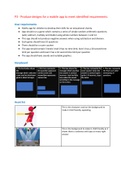
Storyboard
Asset list
This is the character used on the background to
make it child friendly, appealing.
This is the background to make it child friendly as it
shows there is audience and claps on every right
answer.
,Timeplan
Tasks Time
P3 + P4 – produce a design for a 2 days
game/ Review the design
P5 – produce a game 3 days
P6 + P7 – Test and Review the 3 days
game
M2 - justify decisions made 1 day
M3 – Optimise a game 1 day
D2- evaluate the design........client
requirements. 1 day
D3- demonstrate individual
responsibility …... review of a 1 day
mobile app.
P4- Review the mobile app designs with others to identify and inform
refinements.
Martynas: “game design is good and seems very child friendly. You have all the
simple arithmetic questions (+-*/). But you don’t have levels in your game.”
Omar: “the game is good, it has sounds on right/wrong answers. Graphics are very
child friendly. But you don’t have difficulty levels and timer in your game.”
Kieran: “your game flow is very smooth, but you need a timer to make it more
challenging.”
, Alex: “you need to add levels in your game and a timer.”
Kavin: “you have great graphics on your game, very child friendly especially that
character on the stage makes it look more amusing to play. User interface is quite
attractive. But you need to add things such as a timer and difficulty levels.”
Improvements to make
After looking at the feedback I have received I decided to make changes such as
timer. I would add timer into my game which run backwards from 100 seconds on
each game as will give user less time to complete whole quiz, so it makes the
game challenging plus interesting to play. According to Martynas I would stick to
the same design and wouldn’t make any changes to the design. Secondly, I
wouldn’t be able to add difficulty levels due to lack of time because adding levels
and setting the level of difficulty would take a lot of time. So, I would only add a
timer into my game.
Changes after feedback
This the timer I added so the user can know how long it takes him to complete a
quiz.
User requirements
● Maths app for children to develop their skills for an educational charity
● App should run a game which contains a series of simple random arithmetic questions
(add, subtract, multiply and divide) using whole numbers between 1 and 12.
● This app should not produce negative answers when using subtraction and division.
● Each game should have 10 questions
● There should be a score counter
● The app should contain 3 levels: level 0 has no time limit, level 1 has a 20 second time
limit per question and level 2 has a 10 second time limit per question
● The app should have sounds and suitable graphics.
Storyboard
Asset list
This is the character used on the background to
make it child friendly, appealing.
This is the background to make it child friendly as it
shows there is audience and claps on every right
answer.
,Timeplan
Tasks Time
P3 + P4 – produce a design for a 2 days
game/ Review the design
P5 – produce a game 3 days
P6 + P7 – Test and Review the 3 days
game
M2 - justify decisions made 1 day
M3 – Optimise a game 1 day
D2- evaluate the design........client
requirements. 1 day
D3- demonstrate individual
responsibility …... review of a 1 day
mobile app.
P4- Review the mobile app designs with others to identify and inform
refinements.
Martynas: “game design is good and seems very child friendly. You have all the
simple arithmetic questions (+-*/). But you don’t have levels in your game.”
Omar: “the game is good, it has sounds on right/wrong answers. Graphics are very
child friendly. But you don’t have difficulty levels and timer in your game.”
Kieran: “your game flow is very smooth, but you need a timer to make it more
challenging.”
, Alex: “you need to add levels in your game and a timer.”
Kavin: “you have great graphics on your game, very child friendly especially that
character on the stage makes it look more amusing to play. User interface is quite
attractive. But you need to add things such as a timer and difficulty levels.”
Improvements to make
After looking at the feedback I have received I decided to make changes such as
timer. I would add timer into my game which run backwards from 100 seconds on
each game as will give user less time to complete whole quiz, so it makes the
game challenging plus interesting to play. According to Martynas I would stick to
the same design and wouldn’t make any changes to the design. Secondly, I
wouldn’t be able to add difficulty levels due to lack of time because adding levels
and setting the level of difficulty would take a lot of time. So, I would only add a
timer into my game.
Changes after feedback
This the timer I added so the user can know how long it takes him to complete a
quiz.


