In this task I will be preparing a user guide that can help and train workers to able to uses the
internet for following the business activities also includes a step by step guide on how to carry out
each of the activities process:
Procurement (buying)
Business research
Business communication
Promotion
Procurement (buying)
I will be carrying out a shopping transition to buy a good for the business usage which will be a good
quality 4K TV form Tesco. This product will be used by the business to show their slides of their
promotion to both their customers.
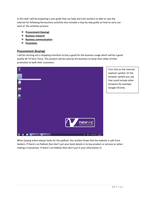
First click on the internet
explorer symbol. Or the
browser symbol you use
that could include other
browsers for example
Google Chrome.
When buying online always looks for the padlock, this symbol shows that the website is safe from
hackers. If there’s no Padlock then don’t put your bank details in to buy product or services or when
making a transaction. If there’s no Padlock then don’t put in your information in.
1|Page
,Then open up Google and then
uses the search engine to type
something in.
The use of this search bar can
allow search engines like Google
to come up recommendations.
That can be used to show the
people which Samsung 4k TV
Google recommends.
Then click on the link you
want to go on.
2|Page
, This is the Tesco websites that
show a range of 4K TVs. This is a
screenshot and that gave me
the chances to chance to pick
from which 4K TV is suitable to
purchase depending on how
much budget I have to spend.
Then I clicked on the
product I want to buy for
the business.
Then I clicked on the “add
to basket” for the product
I want to buy for the
business.
3|Page
internet for following the business activities also includes a step by step guide on how to carry out
each of the activities process:
Procurement (buying)
Business research
Business communication
Promotion
Procurement (buying)
I will be carrying out a shopping transition to buy a good for the business usage which will be a good
quality 4K TV form Tesco. This product will be used by the business to show their slides of their
promotion to both their customers.
First click on the internet
explorer symbol. Or the
browser symbol you use
that could include other
browsers for example
Google Chrome.
When buying online always looks for the padlock, this symbol shows that the website is safe from
hackers. If there’s no Padlock then don’t put your bank details in to buy product or services or when
making a transaction. If there’s no Padlock then don’t put in your information in.
1|Page
,Then open up Google and then
uses the search engine to type
something in.
The use of this search bar can
allow search engines like Google
to come up recommendations.
That can be used to show the
people which Samsung 4k TV
Google recommends.
Then click on the link you
want to go on.
2|Page
, This is the Tesco websites that
show a range of 4K TVs. This is a
screenshot and that gave me
the chances to chance to pick
from which 4K TV is suitable to
purchase depending on how
much budget I have to spend.
Then I clicked on the
product I want to buy for
the business.
Then I clicked on the “add
to basket” for the product
I want to buy for the
business.
3|Page