CHEAT SHEET
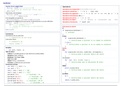
VUEJS 2 PROGRESSIVE FRAMEWORK BASICS, DIRECTIVES & INSTANCES
Created by @Manz ( https://twitter.com/Manz ) https://lenguajejs.com/
d Directives <elem v-directive></elem> { } Template Syntax Templates s Special Tags & Attrs <elem attr></elem>
BASIC DIRECTIVES BASIC (MUSTACHE SYNTAX) SPECIAL ATTRIBUTES
v-text=" s " set textContent (text) {{ var }} show data (props, data...) ref=" s " register elem or child component
{{ v }} use expression or data SHORTHAND {{ bool ? 'Yes' : 'No' }} ternary condition slot=" s " name of component slot
v-html=" s " set innerHTML (raw HTML) XSS {{ var + 's' }} JS short expression slot-scope=" s " scoped slot (expr) 2.5.0+
v-pre skip render {{ vars }} (inside) ADVANCED (MUSTACHE SYNTAX) key=" n s " hint for vDOM identify node
v-cloak hide element until vue is ready {{ computed }} complex expression SPECIAL TAGS
v-once only render {{ vars }} first time {{ var | filter }} apply filter over var <component> meta-component (dynamic)
CONTROL DIRECTIVES is=" s o " used in dynamic components
v-show=" b " css-hide if false (always exists) f Custom Filters
CALLBACK VALUES
inline-template include templates inline
v-if=" b " render content if true, else none f (v) prev. value <keep-alive> cache comp. w/o destroy
GENERAL SYNTAX (GLOBAL)
v-else-if=" b " chained v-if condition 2.1.0+ include=" s " only cache match names 2.1.0+
v-else otherwise, render this content Vue.filter( s name, f filter_fn) exclude=" s " not cache match names 2.1.0+
LOOPS DIRECTIVES max=" n " maximum comp. to cache 2.5.0+
i Vue Instance vm = ViewModel
v-for="i in elem" iterate elem (for...in) <slot> serve as content distribution slot
PROPERTIES
v-for="(v, i) in a " v=value, i=index name=" s " name slot
v-for="(v, k, i) in o " v=value, k=key, i=index o vm.$data data vue observing
v-for="i in n " iterate from 1 to num o vm.$props component props 2.2.0+ t Vue Transitions Transition & Animations
READ-ONLY PROPERTIES
v-for="i in s " iter. from first to last char SINGLE TRANSITIONS
:key=" n s " hint for identify elements e vm.$el root DOM element <transition> transition effect for elem/comp.
BINDING DIRECTIVES
o vm.$options instance custom options name=" s " auto expand name (def: "v")
MODEL FORM BINDING (2-WAY) v vm.$parent parent instance appear apply transition on init render
v-model=" s " bind on input/select/textarea v vm.$root root instance (or itself) css=" b " apply css transition classes
v-model.lazy=" s " listen "change" event a vm.$children direct childs instances type=" s " set "transition" or "animation"
v-model.number=" n " cast to number o vm.$slots distribution slots mode=" s " set timing "out-in" or "in-out"
v-model.trim=" s " strip left/right spaces o vm.$scopedSlots scoped slots 2.1.0+ CLASSES FOR APPLY TRANSITION CLASS
HTML ATTRIBUTE BINDING
o vm.$refs elems registered w/ref attrs enter *-class *-to-class *-active-class
b vm.$isServer server-side instance SSR leave *-class *-to-class *-active-class
v-bind=" o s " bind key:val on element attrs
o vm.$attrs parent-scope attrs bindings appear *-class *-to-class *-active-class
v-bind:attr=" s " bind "s" on attr (ex: alt <img>)
o vm.$listeners parent-scope v-on ev. l.
:attr=" s " binding var "s" on attr SHORTHAND EVENTS
METHODS
:attr=" b " only show attr if true (ex: disabled) enter before-* after-* *-cancelled
:attr.prop =" s " binding as DOM property f vm.$watch( f exp, f fn, o options) leave before-* after-* *-cancelled
:attr.camel =" s " kebab-c camelCase 2.1.0+ * vm.$set( o a tgt, s n key, * v) appear before-* after-* *-cancelled
:attr.sync =" s " expand into v-on handler 2.3.0+ * vm.$delete( o a tgt, s n key)
MULTIPLE TRANSITIONS
CLASS BINDING INLINE EQUIVALENT METHODS (CUSTOM EVENTS)
<transition-group> trans. effect for multiple
:class=" s " add string to class ="'string'" vm.$on( s a s ev, f fn) listen c. ev. tag=" s " convert to html tag 'span'
:class=" a s " add all to class ="[s1,s2]" vm.$once( s ev, f fn) only once move-class=" s " overwrite during trans.
:class=" o b " add key if true ="{key:b}" vm.$off( s a s ev, f fn) remove c. ev.
same trans. props (except mode) & events
STYLE BINDING INLINE EQUIVALENT
vm.$emit( s name, a args) trigger
d Custom Directives Create your v-some!
:style=" s " apply string styles ="'prop:val'" METHODS (LIFECYCLE)
:style=" o s " apply k:v styles ="{prop:val}" v vm.$mount( e s el) manual mount GENERAL SYNTAX (GLOBAL)
:style=" a o s " apply objects ="[o1,o2]" vm.$forceUpdate() force to re-render Vue.directive( ... )
vm.$nextTick( f fn) next DOM update 1 ( s name, o f hooks) global register
EVENTS DIRECTIVES
vm.$destroy() destroy vue instance 2 ( s name, f bind_and_update_fn) SHORTHAND
v-on=" o f " add n-events (key:func) 2.4.0+
v-on:event=" f " add event listener e Custom Events Communication
HOOK METHODS
@event=" f " event listener SHORTHAND
EMIT CUSTOM EVENT FROM CHILD TO PARENT
.bind: f when bound to element (only once)
@event=" f (param, $event)" inline emits custom event w/data to parent: .inserted: f when inserted into parent node
@event.stop=" f " call .stopPropagation() this.$emit('myevent-kebab-case') .update: f after content has updated
@event.prevent=" f " call .preventDefault() CAPTURE CUSTOM EVENT ON PARENT .componentUpdated: f same, and children
@event.capture=" f " capture mode listen capture custom event from child: .unbind: f when unbound from elem (once)
@event.self=" f " trigger only from this @myevent="method-handler" HOOK METHODS ARGUMENTS
@event.once=" f " trigger at most once KEYCODE ALIAS SYSKEY BUTTON e el when bound to element (only once)
@event.keyCode=" f " trigger on key enter up ctrl left HOOK METHODS ARGUMENTS (READ-ONLY)
@event.sysKey=" f " trigger on key 2.1.0+ tab down alt middle o binding data object with...
@event.native=" f " listen native event delete left shift right s .name directive name, w/o v- prefix
@event.button=" f " only mouse button 2.2.0+ esc right meta
space custom * .value directive value, computed
@event.passive=" f " add passive event 2.3.0+ exact WATCH OPTIONS
* .oldValue prev value (update hooks)
b deep nested s .expression value as string
b immediate s .arg argument (ex: v-sample:foo)
n number c component a array o object o .modifiers mods list (ex:v-sample.foo)
s string d date s symbol undefined e vnode virtual node produced by vue
b boolean r regexp t datatype e HTMLElement e oldVnode prev virtual node (update hooks)
b def: true f function * any v Vue instance
VUEJS 2 PROGRESSIVE FRAMEWORK BASICS, DIRECTIVES & INSTANCES
Created by @Manz ( https://twitter.com/Manz ) https://lenguajejs.com/
d Directives <elem v-directive></elem> { } Template Syntax Templates s Special Tags & Attrs <elem attr></elem>
BASIC DIRECTIVES BASIC (MUSTACHE SYNTAX) SPECIAL ATTRIBUTES
v-text=" s " set textContent (text) {{ var }} show data (props, data...) ref=" s " register elem or child component
{{ v }} use expression or data SHORTHAND {{ bool ? 'Yes' : 'No' }} ternary condition slot=" s " name of component slot
v-html=" s " set innerHTML (raw HTML) XSS {{ var + 's' }} JS short expression slot-scope=" s " scoped slot (expr) 2.5.0+
v-pre skip render {{ vars }} (inside) ADVANCED (MUSTACHE SYNTAX) key=" n s " hint for vDOM identify node
v-cloak hide element until vue is ready {{ computed }} complex expression SPECIAL TAGS
v-once only render {{ vars }} first time {{ var | filter }} apply filter over var <component> meta-component (dynamic)
CONTROL DIRECTIVES is=" s o " used in dynamic components
v-show=" b " css-hide if false (always exists) f Custom Filters
CALLBACK VALUES
inline-template include templates inline
v-if=" b " render content if true, else none f (v) prev. value <keep-alive> cache comp. w/o destroy
GENERAL SYNTAX (GLOBAL)
v-else-if=" b " chained v-if condition 2.1.0+ include=" s " only cache match names 2.1.0+
v-else otherwise, render this content Vue.filter( s name, f filter_fn) exclude=" s " not cache match names 2.1.0+
LOOPS DIRECTIVES max=" n " maximum comp. to cache 2.5.0+
i Vue Instance vm = ViewModel
v-for="i in elem" iterate elem (for...in) <slot> serve as content distribution slot
PROPERTIES
v-for="(v, i) in a " v=value, i=index name=" s " name slot
v-for="(v, k, i) in o " v=value, k=key, i=index o vm.$data data vue observing
v-for="i in n " iterate from 1 to num o vm.$props component props 2.2.0+ t Vue Transitions Transition & Animations
READ-ONLY PROPERTIES
v-for="i in s " iter. from first to last char SINGLE TRANSITIONS
:key=" n s " hint for identify elements e vm.$el root DOM element <transition> transition effect for elem/comp.
BINDING DIRECTIVES
o vm.$options instance custom options name=" s " auto expand name (def: "v")
MODEL FORM BINDING (2-WAY) v vm.$parent parent instance appear apply transition on init render
v-model=" s " bind on input/select/textarea v vm.$root root instance (or itself) css=" b " apply css transition classes
v-model.lazy=" s " listen "change" event a vm.$children direct childs instances type=" s " set "transition" or "animation"
v-model.number=" n " cast to number o vm.$slots distribution slots mode=" s " set timing "out-in" or "in-out"
v-model.trim=" s " strip left/right spaces o vm.$scopedSlots scoped slots 2.1.0+ CLASSES FOR APPLY TRANSITION CLASS
HTML ATTRIBUTE BINDING
o vm.$refs elems registered w/ref attrs enter *-class *-to-class *-active-class
b vm.$isServer server-side instance SSR leave *-class *-to-class *-active-class
v-bind=" o s " bind key:val on element attrs
o vm.$attrs parent-scope attrs bindings appear *-class *-to-class *-active-class
v-bind:attr=" s " bind "s" on attr (ex: alt <img>)
o vm.$listeners parent-scope v-on ev. l.
:attr=" s " binding var "s" on attr SHORTHAND EVENTS
METHODS
:attr=" b " only show attr if true (ex: disabled) enter before-* after-* *-cancelled
:attr.prop =" s " binding as DOM property f vm.$watch( f exp, f fn, o options) leave before-* after-* *-cancelled
:attr.camel =" s " kebab-c camelCase 2.1.0+ * vm.$set( o a tgt, s n key, * v) appear before-* after-* *-cancelled
:attr.sync =" s " expand into v-on handler 2.3.0+ * vm.$delete( o a tgt, s n key)
MULTIPLE TRANSITIONS
CLASS BINDING INLINE EQUIVALENT METHODS (CUSTOM EVENTS)
<transition-group> trans. effect for multiple
:class=" s " add string to class ="'string'" vm.$on( s a s ev, f fn) listen c. ev. tag=" s " convert to html tag 'span'
:class=" a s " add all to class ="[s1,s2]" vm.$once( s ev, f fn) only once move-class=" s " overwrite during trans.
:class=" o b " add key if true ="{key:b}" vm.$off( s a s ev, f fn) remove c. ev.
same trans. props (except mode) & events
STYLE BINDING INLINE EQUIVALENT
vm.$emit( s name, a args) trigger
d Custom Directives Create your v-some!
:style=" s " apply string styles ="'prop:val'" METHODS (LIFECYCLE)
:style=" o s " apply k:v styles ="{prop:val}" v vm.$mount( e s el) manual mount GENERAL SYNTAX (GLOBAL)
:style=" a o s " apply objects ="[o1,o2]" vm.$forceUpdate() force to re-render Vue.directive( ... )
vm.$nextTick( f fn) next DOM update 1 ( s name, o f hooks) global register
EVENTS DIRECTIVES
vm.$destroy() destroy vue instance 2 ( s name, f bind_and_update_fn) SHORTHAND
v-on=" o f " add n-events (key:func) 2.4.0+
v-on:event=" f " add event listener e Custom Events Communication
HOOK METHODS
@event=" f " event listener SHORTHAND
EMIT CUSTOM EVENT FROM CHILD TO PARENT
.bind: f when bound to element (only once)
@event=" f (param, $event)" inline emits custom event w/data to parent: .inserted: f when inserted into parent node
@event.stop=" f " call .stopPropagation() this.$emit('myevent-kebab-case') .update: f after content has updated
@event.prevent=" f " call .preventDefault() CAPTURE CUSTOM EVENT ON PARENT .componentUpdated: f same, and children
@event.capture=" f " capture mode listen capture custom event from child: .unbind: f when unbound from elem (once)
@event.self=" f " trigger only from this @myevent="method-handler" HOOK METHODS ARGUMENTS
@event.once=" f " trigger at most once KEYCODE ALIAS SYSKEY BUTTON e el when bound to element (only once)
@event.keyCode=" f " trigger on key enter up ctrl left HOOK METHODS ARGUMENTS (READ-ONLY)
@event.sysKey=" f " trigger on key 2.1.0+ tab down alt middle o binding data object with...
@event.native=" f " listen native event delete left shift right s .name directive name, w/o v- prefix
@event.button=" f " only mouse button 2.2.0+ esc right meta
space custom * .value directive value, computed
@event.passive=" f " add passive event 2.3.0+ exact WATCH OPTIONS
* .oldValue prev value (update hooks)
b deep nested s .expression value as string
b immediate s .arg argument (ex: v-sample:foo)
n number c component a array o object o .modifiers mods list (ex:v-sample.foo)
s string d date s symbol undefined e vnode virtual node produced by vue
b boolean r regexp t datatype e HTMLElement e oldVnode prev virtual node (update hooks)
b def: true f function * any v Vue instance