Module: IT for Communication Wk 2
Questions:-
How Information Technology can help disabled people to communicate effectively?
Briefly explain what is meant by an Operating System. List down three functions o
an operating system.
Explain clearly what is meant by the term multitasking
Describe the following terms:
» Graphic user interfaces
» Menu driven interfaces
» Command driven interfaces
Describe the impact of ICT in society
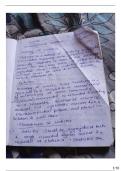
Answers:-
Display board devices
Display board devices use pictures or icons for communication. Phrases and photo
can be customized. This is the type most commonly used for children.
Devices with keyboards
Devices with keyboards allow users to type a message that is then spoken aloud
Uses text to speech software and message prediction.
Alternative keyboards are ergonomic keyboards for people who have hand an
upper limb injuries, keyboards that present the keys in a different order (ABC rathe
than the conventional QWERTY), keyboards that use large keys and color coding o
the letters for people with cognitive and/or vision impairment and key guards tha
can be used to reduce the risk of the wrong key being activated. Some alternativ
keyboards can also function as a mouse through the use of mouse keys which allow
the user to control the movement of the mouse cursor with the numeric keypad.
Onscreen virtual keyboards are used by some people are unable to type, perhaps du
to impaired mobility, but still require the functionality provided by a keyboard
Specialist accessibility software can be used to display a virtual keyboard on th
computer screen that allows users to enter data with a standard mouse, pointing
device or joystick. Onscreen virtual keyboards can also help people who do no
know how to type.
Devices with eye tracking
, A camera tracks eye movement, allowing the user to select options by blinking o
scanning the screen. People with little or no control over the movement of thei
hands, and who also may not be able to speak, can use eye-tracking systems t
operate a computer and access the Internet. Some eye tracking software can b
combined with a virtual keyboard allowing the user to type by moving their eyes.
Multi-purpose devices
Multi-purpose devices include text to speech or eye tracking. They also may b
equipped with wireless internet access and bluetooth technology, and be able to
control household devices, including the telephone. Even the iPod can be used to
help students with learning disabilities due to attention deficit hyperactivity disorde
to focus on study guides through the iPREPpress. This service offers downloads o
study guides, foreign language lessons and test preparation materials. People who
have hand limitations may choose to use a portable computer in the classroom fo
taking notes. The person will be able to make her own notes without trying to
manage pen and paper.
Operating system is software which is part of a computer system that provides
platform for other programs to run on for the management and coordination o
activities and handles the operations of computer hardware.
1. Error detection
2. Execution of program
3. Input/output operation
Multitasking is the operation of two or more processes by the computer on a singl
CPU at the same time.
A graphical user interface (GUI) is a human-computer interface that uses pictorial a
well as textual representations rather than text commands and can be directly
manipulated by a mouse. GUIs can be used in computers, hand-held devices such a
MP3 players, portable media players or gaming devices, household appliances and
office equipment. Graphical user interfaces, such as Microsoft Windows and the on
used by the Apple Macintosh, feature the following basic components such a
pointer, pointing device, icons, desktop and menus. A software interface that take
advantage of the computer's graphics simplify the use of computer program
without learning complex command languages by using a mouse-controlled scree
cursor to select options from menus, make choices with buttons and start program
Questions:-
How Information Technology can help disabled people to communicate effectively?
Briefly explain what is meant by an Operating System. List down three functions o
an operating system.
Explain clearly what is meant by the term multitasking
Describe the following terms:
» Graphic user interfaces
» Menu driven interfaces
» Command driven interfaces
Describe the impact of ICT in society
Answers:-
Display board devices
Display board devices use pictures or icons for communication. Phrases and photo
can be customized. This is the type most commonly used for children.
Devices with keyboards
Devices with keyboards allow users to type a message that is then spoken aloud
Uses text to speech software and message prediction.
Alternative keyboards are ergonomic keyboards for people who have hand an
upper limb injuries, keyboards that present the keys in a different order (ABC rathe
than the conventional QWERTY), keyboards that use large keys and color coding o
the letters for people with cognitive and/or vision impairment and key guards tha
can be used to reduce the risk of the wrong key being activated. Some alternativ
keyboards can also function as a mouse through the use of mouse keys which allow
the user to control the movement of the mouse cursor with the numeric keypad.
Onscreen virtual keyboards are used by some people are unable to type, perhaps du
to impaired mobility, but still require the functionality provided by a keyboard
Specialist accessibility software can be used to display a virtual keyboard on th
computer screen that allows users to enter data with a standard mouse, pointing
device or joystick. Onscreen virtual keyboards can also help people who do no
know how to type.
Devices with eye tracking
, A camera tracks eye movement, allowing the user to select options by blinking o
scanning the screen. People with little or no control over the movement of thei
hands, and who also may not be able to speak, can use eye-tracking systems t
operate a computer and access the Internet. Some eye tracking software can b
combined with a virtual keyboard allowing the user to type by moving their eyes.
Multi-purpose devices
Multi-purpose devices include text to speech or eye tracking. They also may b
equipped with wireless internet access and bluetooth technology, and be able to
control household devices, including the telephone. Even the iPod can be used to
help students with learning disabilities due to attention deficit hyperactivity disorde
to focus on study guides through the iPREPpress. This service offers downloads o
study guides, foreign language lessons and test preparation materials. People who
have hand limitations may choose to use a portable computer in the classroom fo
taking notes. The person will be able to make her own notes without trying to
manage pen and paper.
Operating system is software which is part of a computer system that provides
platform for other programs to run on for the management and coordination o
activities and handles the operations of computer hardware.
1. Error detection
2. Execution of program
3. Input/output operation
Multitasking is the operation of two or more processes by the computer on a singl
CPU at the same time.
A graphical user interface (GUI) is a human-computer interface that uses pictorial a
well as textual representations rather than text commands and can be directly
manipulated by a mouse. GUIs can be used in computers, hand-held devices such a
MP3 players, portable media players or gaming devices, household appliances and
office equipment. Graphical user interfaces, such as Microsoft Windows and the on
used by the Apple Macintosh, feature the following basic components such a
pointer, pointing device, icons, desktop and menus. A software interface that take
advantage of the computer's graphics simplify the use of computer program
without learning complex command languages by using a mouse-controlled scree
cursor to select options from menus, make choices with buttons and start program