Computer
Science
Paper
1
,
, 1.1.1
Binary Systems
• Recognise the use of binary numbers in computer systems
• Convert positive denary integers into binary and positive binary integers into denary (a maximum of
16 bits will be used)
• Show understanding of the concept of a byte and how the byte is used to measure memory size
• Use binary in computer registers for a given application (such as in robotics, digital instruments and
counting systems)
1.1.2
Hexadecimal
• Represent positive numbers in hexadecimal notation
• Show understanding of the reasons for choosing hexadecimal notation to represent numbers
• Convert positive hexadecimal integers to and from denary (a maximum of four hexadecimal digits will be required)
• Convert positive hexadecimal integers to and from binary (a maximum of 16 bit binary numbers will be required)
• Represent numbers stored in registers and main memory as hexadecimal
• Identify current uses of hexadecimal numbers in computing, such as defining colours in Hypertext Markup Language
(HTML), Media Access Control (MAC) addresses, assembly languages and machine code, debugging
, hear
burning
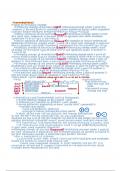
• Binary = Computer 1’s + 0’s w/ Base 2 • Base 16
• Denary = English w/ base 10 • Uses 0-9 + A-F
• data + program instructions stored binary Denary 0 1112151415
/Oi23456789ABCDt
I 2 3 4 56 7 8 9 10
• number to left x2
Hex
7- 6 5 4
3 2 1 : Number of bits
Set up : Denary Hex Ivia binary1
***
→
256 128 64 32 16 8 4 2 1
1) 89 12864 3216 8 4 2 I
←
Number of bits
oI = 89 : Denary
Largest representable : 12h ) I -
= 01011001 : Binary
Number of values can be presented : 2
"
%IYIi = 59 : Hexadecimal
Number of bits Largest Representable
number
Number of values can
be represented
-59
128 64 32 16 8 4 2 I
2) 197 o I = 197
8 4 2 I 8 4 2 I =11000101
10110011 →
Denary = CF
-
256 128 64 32 16 8 4 2 1
= 179 12=6 5
*
1 0 1 1 0 0 1 1 in
If there is 1 in code Hex → Denary 1via binary)
= odd number
128T 32+16+2+1 =
TEETH na 1) D3 →
13 I 3 → i
128 64 32 16 8 4 2 I
111101000 →
Denary = 11010011 = lIi
256 128 64 32 16 8 4 2 1 128 + 64 + 16 + 2 + 1 = 211
= 488
1 1 1 1 0 1 0 0 0 Hex → DenaryIdirect1
256+128+64 +32+8=-488 1) 14C
¥Y"
"
= Denary Binary 256 16 1
4096 256 16 1
÷.mu
. .
247 Binary
16 8 4 2 1
256 128 64 32 ' 256×1=256
' = 11110111 64 4096×4=16,384
16×4 =
× 1 1 1 1 0 1 1 1 1×12 = 12 256×12 =
3,072
" 16×2 32
T
1¥
=
%
-
Too big '
146=33-2
1346213=19,5-01
Too big a " 1×13 =
398 Binary benefits
256 128 64 32 16 8 4 2 1 + Uses less space screen
f = 110001110 + Represent larger numbers w/ fewer characters
1 1 0 0 0 1 1 1 0 + Easy + quick understand/ debug/ remember
+ Easier spot error
www.nder Method = Denary →
Binary
74 Binary
74/2 = 37r
¥g
0
run
Divide by 2
|
47/2 = 18r 1 Memory dump
18/2 = 9r 0 • Computer holds key solve problems + output content to printer/ monitor
9/2 = 4r 1 = 1001010 • Spots errors
4/2 = 2r 0
2/2 = 1r 0 MAC Address (Media Access Control) + µ,
• Number UNIQUELY identifies device on network/ internet
1/2 = 0r 1
HTML colour codes (Hypertext mark-up language)
173 →
Binary • Red, green, blue = each code 3 bytes memory
173/2 = 86r 1 • Each colour there is 0-255 (0-FF)
86/2 = 43r 0 - 000000 : is black (no colour)
RG1X
43/2 = 21r 1 - FFFFFF : is white (all colour)
= 10101101
# OD FF 34
21/2 = 10r 1
10/2 = 5r 0
5/2 = 2r 1
2/2 = 1r 0
1/2 = 0r 1
Science
Paper
1
,
, 1.1.1
Binary Systems
• Recognise the use of binary numbers in computer systems
• Convert positive denary integers into binary and positive binary integers into denary (a maximum of
16 bits will be used)
• Show understanding of the concept of a byte and how the byte is used to measure memory size
• Use binary in computer registers for a given application (such as in robotics, digital instruments and
counting systems)
1.1.2
Hexadecimal
• Represent positive numbers in hexadecimal notation
• Show understanding of the reasons for choosing hexadecimal notation to represent numbers
• Convert positive hexadecimal integers to and from denary (a maximum of four hexadecimal digits will be required)
• Convert positive hexadecimal integers to and from binary (a maximum of 16 bit binary numbers will be required)
• Represent numbers stored in registers and main memory as hexadecimal
• Identify current uses of hexadecimal numbers in computing, such as defining colours in Hypertext Markup Language
(HTML), Media Access Control (MAC) addresses, assembly languages and machine code, debugging
, hear
burning
• Binary = Computer 1’s + 0’s w/ Base 2 • Base 16
• Denary = English w/ base 10 • Uses 0-9 + A-F
• data + program instructions stored binary Denary 0 1112151415
/Oi23456789ABCDt
I 2 3 4 56 7 8 9 10
• number to left x2
Hex
7- 6 5 4
3 2 1 : Number of bits
Set up : Denary Hex Ivia binary1
***
→
256 128 64 32 16 8 4 2 1
1) 89 12864 3216 8 4 2 I
←
Number of bits
oI = 89 : Denary
Largest representable : 12h ) I -
= 01011001 : Binary
Number of values can be presented : 2
"
%IYIi = 59 : Hexadecimal
Number of bits Largest Representable
number
Number of values can
be represented
-59
128 64 32 16 8 4 2 I
2) 197 o I = 197
8 4 2 I 8 4 2 I =11000101
10110011 →
Denary = CF
-
256 128 64 32 16 8 4 2 1
= 179 12=6 5
*
1 0 1 1 0 0 1 1 in
If there is 1 in code Hex → Denary 1via binary)
= odd number
128T 32+16+2+1 =
TEETH na 1) D3 →
13 I 3 → i
128 64 32 16 8 4 2 I
111101000 →
Denary = 11010011 = lIi
256 128 64 32 16 8 4 2 1 128 + 64 + 16 + 2 + 1 = 211
= 488
1 1 1 1 0 1 0 0 0 Hex → DenaryIdirect1
256+128+64 +32+8=-488 1) 14C
¥Y"
"
= Denary Binary 256 16 1
4096 256 16 1
÷.mu
. .
247 Binary
16 8 4 2 1
256 128 64 32 ' 256×1=256
' = 11110111 64 4096×4=16,384
16×4 =
× 1 1 1 1 0 1 1 1 1×12 = 12 256×12 =
3,072
" 16×2 32
T
1¥
=
%
-
Too big '
146=33-2
1346213=19,5-01
Too big a " 1×13 =
398 Binary benefits
256 128 64 32 16 8 4 2 1 + Uses less space screen
f = 110001110 + Represent larger numbers w/ fewer characters
1 1 0 0 0 1 1 1 0 + Easy + quick understand/ debug/ remember
+ Easier spot error
www.nder Method = Denary →
Binary
74 Binary
74/2 = 37r
¥g
0
run
Divide by 2
|
47/2 = 18r 1 Memory dump
18/2 = 9r 0 • Computer holds key solve problems + output content to printer/ monitor
9/2 = 4r 1 = 1001010 • Spots errors
4/2 = 2r 0
2/2 = 1r 0 MAC Address (Media Access Control) + µ,
• Number UNIQUELY identifies device on network/ internet
1/2 = 0r 1
HTML colour codes (Hypertext mark-up language)
173 →
Binary • Red, green, blue = each code 3 bytes memory
173/2 = 86r 1 • Each colour there is 0-255 (0-FF)
86/2 = 43r 0 - 000000 : is black (no colour)
RG1X
43/2 = 21r 1 - FFFFFF : is white (all colour)
= 10101101
# OD FF 34
21/2 = 10r 1
10/2 = 5r 0
5/2 = 2r 1
2/2 = 1r 0
1/2 = 0r 1