3. Using Superscripts and
Subscripts
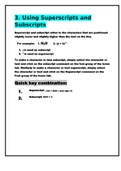
Superscript and subscript refers to the characters that are positioned
slightly lower and slightly higher than the text on the line.
For example: 1. H2O 2. (a + b) 2
1. 2 is used as subscript
2. 2
is used as superscript
To make a character or text subscript, simply select the character or
text and click on the subscript command on the font group of the home
tab. Similarly to make a character or text superscript, simply select
the character or text and click on the Superscript command on the
Font group of the home tab.
Quick key combination:
1. Superscript : Ctrl + Shift + plus sign (+)
2. Subscript: Ctrl + =
Subscripts
Superscript and subscript refers to the characters that are positioned
slightly lower and slightly higher than the text on the line.
For example: 1. H2O 2. (a + b) 2
1. 2 is used as subscript
2. 2
is used as superscript
To make a character or text subscript, simply select the character or
text and click on the subscript command on the font group of the home
tab. Similarly to make a character or text superscript, simply select
the character or text and click on the Superscript command on the
Font group of the home tab.
Quick key combination:
1. Superscript : Ctrl + Shift + plus sign (+)
2. Subscript: Ctrl + =