

Written by students who passed Immediately available after payment Read online or as PDF Wrong document? Swap it for free 4.6 TrustPilot
logo-home
Document preview thumbnail
Preview 1 out of 2 pages
Lecture notes

How emails work

Document preview thumbnail
Preview 1 out of 2 pages

For college students diving into the intricacies of communication in the digital age, understanding how emails work is akin to unlocking a powerful tool that shapes academic and professional interactions. Picture emails as digital letters, traveling through the vast highways of the internet to reach their destinations – whether it be a professor, a classmate, or a potential employer. At its core, an email is a composed message, akin to a letter, accompanied by an address and sent via electronic means. As a college student, comprehending the mechanics of email involves recognizing the role of servers as post offices in this virtual landscape. When you hit "send," your email becomes a series of data packets, each containing a portion of your message, en route to the recipient's email server. This process relies on various protocols, such as SMTP (Simple Mail Transfer Protocol), guiding the departure, transit, and arrival of these digital missives. Moreover, understanding how emails work is not merely about the technicalities but also about grasping the etiquette and professionalism associated with electronic communication. From crafting a clear subject line to mastering the art of a concise yet comprehensive message, college students navigate the nuances of effective email communication. Learning to attach files, reply-all judiciously, and manage an inbox efficiently are valuable skills that extend beyond academia, preparing students for the demands of a connected, digital world and fostering effective communication in both personal and professional realms. For college students diving into the intricacies of communication in the digital age, understanding how emails work is akin to unlocking a powerful tool that shapes academic and professional interactions. Picture emails as digital letters, traveling through the vast highways of the internet to reach their destinations – whether it be a professor, a classmate, or a potential employer. At its core, an email is a composed message, akin to a letter, accompanied by an address and sent via electronic means. As a college student, comprehending the mechanics of email involves recognizing the role of servers as post offices in this virtual landscape. When you hit "send," your email becomes a series of data packets, each containing a portion of your message, en route to the recipient's email server. This process relies on various protocols, such as SMTP (Simple Mail Transfer Protocol), guiding the departure, transit, and arrival of these digital missives. Moreover, understanding how emails work is not merely about the technicalities but also about grasping the etiquette and professionalism associated with electronic communication. From crafting a clear subject line to mastering the art of a concise yet comprehensive message, college students navigate the nuances of effective email communication. Learning to attach files, reply-all judiciously, and manage an inbox efficiently are valuable skills that extend beyond academia, preparing students for the demands of a connected, digital world and fostering effective communication in both personal and professional realms.

Content preview

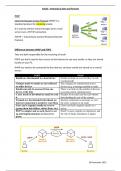
Emails – Protocols & Store and Forward


IMAP

Internet Message Access Protocol (IMAP) is a
standard protocol for receiving emails.
It is used to retrieve email messages form a mail
server over a TCP/IP connection.
TCP/IP = Transmission Control Protocol/Internet
Protocol


Difference between IMAP and POP3
They are both responsible for the receiving of email
POP3 you don’t need to have access to the Internet to see your emails, as they are stored
locally on your PC.
IMAP you need to be connected to the Internet, and your emails are stored on a central
server.
POP3 IMAP
Emails are downloaded to a local device Emails are kept on a server (they’re only
synchronized)
Changes made to emails are not reflected Any changes are synchronized across
on other devices devices (e.g. a message marked as read)
Emails can only be accessed from one There’s no limit on the number of devices
device at the time accessing emails simultaneously
A user needs to download an email to read Headers of an email can be read without
it downloading the rest of the content
If emails are downloaded beforehand, no Internet connection is necessary to view
internet connection is needed to read them the entire contents of an email
Users can’t organise emails on a server Users can freely organise emails on a
(group them into folders, delete them, etc.) server
POP3 is simpler and as such, faster to set IMAP is more complex to implement, and
up and implementations are less error- the risk of faulty installation is higher
prone


28 November 2023

Document information

Study Level
Subject
Uploaded on
February 15, 2024
Number of pages
2
Written in
2023/2024
Type
Lecture notes
Professor(s)
Jj
Contains
All classes
£14.19

Wrong document? Swap it for free Within 14 days of purchase and before downloading, you can choose a different document. You can simply spend the amount again.
Written by students who passed
Immediately available after payment
Read online or as PDF

Sold
0
Followers
0
Items
5
Last sold
-


Why students choose Stuvia

Created by fellow students, verified by reviews

Quality you can trust: written by students who passed their exams and reviewed by others who've used these revision notes.

Didn't get what you expected? Choose another document

No problem! You can straightaway pick a different document that better suits what you're after.

Pay as you like, start learning straight away

No subscription, no commitments. Pay the way you're used to via credit card and download your PDF document instantly.

Student with book image

“Bought, downloaded, and smashed it. It really can be that simple.”

Alisha Student

Working on your references?

Create accurate citations in APA, MLA and Harvard with our free citation generator.

Working on your references?

Frequently asked questions

