COMPONENTS OF COMPUTER SYSTEMS
There are five categories regarding to computer systems: Input, output, backing storage, OS software and
software utilities. Each category has an essential purpose to ensure the computer runs smoothly.
Arithmetic Logic
Unit Control Unit
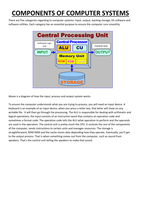
Above is a diagram of how the input, process and output system works.
To ensure the computer understands what you are trying to process, you will need an input device. A
keyboard is an example of an input device, when you press a letter key, that letter will show on any
writable file. It will then go through the processing. The ALU is responsible for dealing with arithmetic and
logical operations; the input consists of an instruction word that contains an operation code and
sometimes a format code. The operation code tells the ALU what operation to perform and the operands
are used in the operation. The control unit is pretty much the CPU. It controls the rest of the components
of the computer, sends instructions to certain units and manages resources. The storage is
straightforward, ROM RAM and the cache stores data depending how they operate. Eventually, you’ll get
to the output process. That is when something comes out from the computer, such as sound from
speakers. That’s the control unit telling the speakers to make that sound.
There are five categories regarding to computer systems: Input, output, backing storage, OS software and
software utilities. Each category has an essential purpose to ensure the computer runs smoothly.
Arithmetic Logic
Unit Control Unit
Above is a diagram of how the input, process and output system works.
To ensure the computer understands what you are trying to process, you will need an input device. A
keyboard is an example of an input device, when you press a letter key, that letter will show on any
writable file. It will then go through the processing. The ALU is responsible for dealing with arithmetic and
logical operations; the input consists of an instruction word that contains an operation code and
sometimes a format code. The operation code tells the ALU what operation to perform and the operands
are used in the operation. The control unit is pretty much the CPU. It controls the rest of the components
of the computer, sends instructions to certain units and manages resources. The storage is
straightforward, ROM RAM and the cache stores data depending how they operate. Eventually, you’ll get
to the output process. That is when something comes out from the computer, such as sound from
speakers. That’s the control unit telling the speakers to make that sound.