Unit 15
Making a vertical Progressbar
Using a Class [and overrides]
1. Open a new project
2. Add a class, call it MyVerticalProgressbar
3. Add the following code...
Imports System
Imports System.Windows.Forms
Public Class MyVerticalProgressbar
Inherits ProgressBar
Protected Overrides ReadOnly Property CreateParams() _
As System.Windows.Forms.CreateParams
Get
Dim cp As CreateParams = MyBase.CreateParams
cp.Style = cp.Style Or &H4
Return cp
End Get
End Property
End Class
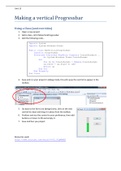
4. Save and run your project in debug mode, this will cause the control to appear in the
toolbox.
5. Go back to the form1.vb [design] view, click on the new
control [ie class] and drag it in place from the toolbox.
6. Position and size the control to your preference, then add
buttons or timers to fill and empty it.
7. Save and Run you project.
Resources used:
http://www.youtube.com/watch?v=0Z_3CgWRMEE
Making a vertical Progressbar
Using a Class [and overrides]
1. Open a new project
2. Add a class, call it MyVerticalProgressbar
3. Add the following code...
Imports System
Imports System.Windows.Forms
Public Class MyVerticalProgressbar
Inherits ProgressBar
Protected Overrides ReadOnly Property CreateParams() _
As System.Windows.Forms.CreateParams
Get
Dim cp As CreateParams = MyBase.CreateParams
cp.Style = cp.Style Or &H4
Return cp
End Get
End Property
End Class
4. Save and run your project in debug mode, this will cause the control to appear in the
toolbox.
5. Go back to the form1.vb [design] view, click on the new
control [ie class] and drag it in place from the toolbox.
6. Position and size the control to your preference, then add
buttons or timers to fill and empty it.
7. Save and Run you project.
Resources used:
http://www.youtube.com/watch?v=0Z_3CgWRMEE