
Lab - Troubleshoot IPv4 and IPv6 Static and Default Routers
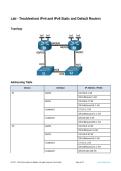
Topology
Addressing Table
Device Interface IP Address / Prefix
R1 G0/0/0 192.168.0.1 /28
R1 G0/0/0
2001:db8:acad::1 /64
R1
G0/0/1 192.168.0.17 /28
R1 G0/0/1
2001:db8:acad:16::1 /64
R1
Loopback1 172.16.1.1 /24
R1 Loopback1
2001:db8:acad:171::1 /64
R1
Loopback2 209.165.200.1 /25
R1 Loopback2
2001:db8:acad:209::1 /64
R2 G0/0/0 192.168.0.14 /28
R2 G0/0/0
2001:db8:acad::14 /64
R2
G0/0/1 192.168.0.30 /28
R2 G0/0/1
2001:db8:acad:16::2 /64
R2
Loopback1 172.16.2.1 /24
R2 Loopback1
2001:db8:acad:172::1 /64
R2
Loopback2 209.165.200.129 /25
2017 - 2024 Cisco and/or its affiliates. All rights reserved. Cisco Public Page 1 of 7 www.netacad.com
, Lab - Troubleshoot IPv4 and IPv6 Static and Default Routers
Device Interface IP Address / Prefix
R2 Loopback2
2001:db8:acad:210::1 /64
Objectives
Part 1: Evaluate Network Operation
Part 2: Gather information, create an action plan, and implement corrections
Background / Scenario
Instructor Note: Preconfiguration scripts for all the devices are located below. Cut and paste or otherwise use
these to pre-configure the equipment for the student.
Router R1
enable
config terminal
hostname R1
ipv6 unicast-routing
interface g0/0/1
ip address 192.168.0.17 255.255.255.240
ipv6 address fe80::1 link-local
ipv6 address 2001:db8:acad:16::1/64
no shutdown
interface g0/0/0
ip address 192.168.0.1 255.255.255.240
ipv6 address fe80::1 link-local
ipv6 address 2001:db8:acad::1/64
no shutdown
interface loopback 1
ip address 172.16.1.1 255.255.255.0
ipv6 address fe80::1 link-local
ipv6 address 2001:db8:acad:171::1/64
interface loopback 2
ip address 209.165.200.1 255.255.255.128
ipv6 address fe80::1 link-local
ipv6 address 2001:db8:acad:209::1/64
!ip route 209.165.200.128 255.255.255.128 192.168.0.30
ip route 209.165.200.128 255.255.255.128 192.168.0.3
ip route 0.0.0.0 0.0.0.0 192.168.0.14 80
!ip route 0.0.0.0 0.0.0.0 192.168.0.14
!ip route 0.0.0.0 0.0.0.0 192.168.0.30 80
ip route 0.0.0.0 0.0.0.0 192.168.0.3
ipv6 route ::/0 2001:db8:acad:16::2
Router R2
enable
config terminal
Topology
Addressing Table
Device Interface IP Address / Prefix
R1 G0/0/0 192.168.0.1 /28
R1 G0/0/0
2001:db8:acad::1 /64
R1
G0/0/1 192.168.0.17 /28
R1 G0/0/1
2001:db8:acad:16::1 /64
R1
Loopback1 172.16.1.1 /24
R1 Loopback1
2001:db8:acad:171::1 /64
R1
Loopback2 209.165.200.1 /25
R1 Loopback2
2001:db8:acad:209::1 /64
R2 G0/0/0 192.168.0.14 /28
R2 G0/0/0
2001:db8:acad::14 /64
R2
G0/0/1 192.168.0.30 /28
R2 G0/0/1
2001:db8:acad:16::2 /64
R2
Loopback1 172.16.2.1 /24
R2 Loopback1
2001:db8:acad:172::1 /64
R2
Loopback2 209.165.200.129 /25
2017 - 2024 Cisco and/or its affiliates. All rights reserved. Cisco Public Page 1 of 7 www.netacad.com
, Lab - Troubleshoot IPv4 and IPv6 Static and Default Routers
Device Interface IP Address / Prefix
R2 Loopback2
2001:db8:acad:210::1 /64
Objectives
Part 1: Evaluate Network Operation
Part 2: Gather information, create an action plan, and implement corrections
Background / Scenario
Instructor Note: Preconfiguration scripts for all the devices are located below. Cut and paste or otherwise use
these to pre-configure the equipment for the student.
Router R1
enable
config terminal
hostname R1
ipv6 unicast-routing
interface g0/0/1
ip address 192.168.0.17 255.255.255.240
ipv6 address fe80::1 link-local
ipv6 address 2001:db8:acad:16::1/64
no shutdown
interface g0/0/0
ip address 192.168.0.1 255.255.255.240
ipv6 address fe80::1 link-local
ipv6 address 2001:db8:acad::1/64
no shutdown
interface loopback 1
ip address 172.16.1.1 255.255.255.0
ipv6 address fe80::1 link-local
ipv6 address 2001:db8:acad:171::1/64
interface loopback 2
ip address 209.165.200.1 255.255.255.128
ipv6 address fe80::1 link-local
ipv6 address 2001:db8:acad:209::1/64
!ip route 209.165.200.128 255.255.255.128 192.168.0.30
ip route 209.165.200.128 255.255.255.128 192.168.0.3
ip route 0.0.0.0 0.0.0.0 192.168.0.14 80
!ip route 0.0.0.0 0.0.0.0 192.168.0.14
!ip route 0.0.0.0 0.0.0.0 192.168.0.30 80
ip route 0.0.0.0 0.0.0.0 192.168.0.3
ipv6 route ::/0 2001:db8:acad:16::2
Router R2
enable
config terminal


