Adobe Photoshop CC Test Mode Practice Tests with Complete Solutions
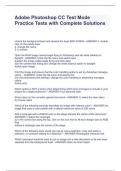
Adobe Photoshop CC Test Mode Practice Tests with Complete Solutions Adobe Photoshop CC Test Mode Practice Tests with Complete Solutions Adobe Photoshop CC Test Mode Practice Tests with Complete Solutions Adobe Photoshop CC Test Mode Practice Tests with Complete Solutions Unlock the background layer and rename the layer RED PANDA - ANSWER-1. double click on the panda layer 2. change the name 3. it unlocks Open the RAW image named eagle flying in Photoshop and set white balance to daylight - ANSWER-1)click the file menu and select open 2)select the image called eagle flying and click open 3)in the camera raw dialog box change the white balance option to daylight 4)click open image Print the image and ensure that the color handling option is set to photoshop manages colors. - ANSWER-1)click the file menu and select print 2)in the photoshop print settings, change the color handling to photoshop manages colors.

Geschreven voor
- Instelling
- Adobe Photoshop CC
- Vak
- Adobe Photoshop CC
Documentinformatie
- Geüpload op
- 10 februari 2024
- Aantal pagina's
- 3
- Geschreven in
- 2023/2024
- Type
- Tentamen (uitwerkingen)
- Bevat
- Vragen en antwoorden
Onderwerpen
-
adobe photoshop cc test mode practice tests with c
-
adobe photoshop cc test mode practice tests stuvia
-
unlock the background layer and rename the layer

Ook beschikbaar in voordeelbundel