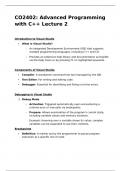
CO2402: Advanced Programming
with C++ Lecture 2
Introduction to Visual Studio
What is Visual Studio?
o An Integrated Development Environment (IDE) that supports
multiple programming languages, including C++ and C#.
o Provides an extensive help library and documentation accessible
via the Help menu or by pressing F1 on highlighted keywords.
Components of Visual Studio:
Compiler: A standalone command-line tool managed by the IDE.
Text Editor: For writing and editing code.
Debugger: Essential for identifying and fixing run-time errors.
Debugging in Visual Studio
1. Debug Mode
o Activation: Triggered automatically upon encountering a
runtime error or manually via breakpoints.
o Purpose: Allows examination of the program's current state,
including variable values and memory locations.
Example: Hovering over a variable shows its value; complex
variables can be expanded to see their contents.
Breakpoints
Definition: A marker set by the programmer to pause program
execution at a specific line of code.
with C++ Lecture 2
Introduction to Visual Studio
What is Visual Studio?
o An Integrated Development Environment (IDE) that supports
multiple programming languages, including C++ and C#.
o Provides an extensive help library and documentation accessible
via the Help menu or by pressing F1 on highlighted keywords.
Components of Visual Studio:
Compiler: A standalone command-line tool managed by the IDE.
Text Editor: For writing and editing code.
Debugger: Essential for identifying and fixing run-time errors.
Debugging in Visual Studio
1. Debug Mode
o Activation: Triggered automatically upon encountering a
runtime error or manually via breakpoints.
o Purpose: Allows examination of the program's current state,
including variable values and memory locations.
Example: Hovering over a variable shows its value; complex
variables can be expanded to see their contents.
Breakpoints
Definition: A marker set by the programmer to pause program
execution at a specific line of code.