
hardware
Case’s
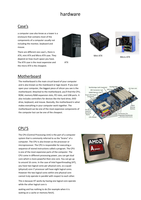
a computer case also know as a tower is a
enclosure that contains most of the
components of a computer usually not
including the monitor, keyboard and
mouse.
There are different size case’s, there is
ATX, mini ATX and Micro ATX case. They Mini ATX
Micro ATX
depend on how much space you have.
The ATX case is the most expensive and ATX
the micro ATX is the cheapest.
Motherboard
The motherboard is the main circuit board of your computer
and is also known as the mainboard or logic board. If you ever
open your computer, the biggest piece of silicon you see is the
motherboard. Attached to the motherboard, you'll find the CPU,
ROM, memory RAM expansion slots, PCI slots, and USB ports. It
also includes controllers for devices like the hard drive, DVD
drive, keyboard, and mouse. Basically, the motherboard is what
makes everything in your computer work together. The
motherboard can be one of the most expensive components of
the computer but can be one of the cheapest.
CPU’S
The CPU (Central Processing Unit) is the part of a computer
system that is commonly referred to as the "brains" of a
computer. The CPU is also known as the processor or
microprocessor. The CPU is responsible for executing a
sequence of stored instructions called a program. The CPU
is one of the most expensive parts of the computer. The
CPU come in different processing power, you can get dual
core which is more powerful then one core. You can go up
to around 16 cores. In the case of Intel hyperthreading (HT),
you have two logical cores per physical core, so a quad-
(physical) core i7 processor will have eight logical cores.
However the two logical cores within one physical core
cannot truly operate in parallel with respect to each other.
This is because HT works by having one logical core operate
while the other logical core is
waiting and has nothing to do (for example when it is
waiting on a cache or memory fetch).
Case’s
a computer case also know as a tower is a
enclosure that contains most of the
components of a computer usually not
including the monitor, keyboard and
mouse.
There are different size case’s, there is
ATX, mini ATX and Micro ATX case. They Mini ATX
Micro ATX
depend on how much space you have.
The ATX case is the most expensive and ATX
the micro ATX is the cheapest.
Motherboard
The motherboard is the main circuit board of your computer
and is also known as the mainboard or logic board. If you ever
open your computer, the biggest piece of silicon you see is the
motherboard. Attached to the motherboard, you'll find the CPU,
ROM, memory RAM expansion slots, PCI slots, and USB ports. It
also includes controllers for devices like the hard drive, DVD
drive, keyboard, and mouse. Basically, the motherboard is what
makes everything in your computer work together. The
motherboard can be one of the most expensive components of
the computer but can be one of the cheapest.
CPU’S
The CPU (Central Processing Unit) is the part of a computer
system that is commonly referred to as the "brains" of a
computer. The CPU is also known as the processor or
microprocessor. The CPU is responsible for executing a
sequence of stored instructions called a program. The CPU
is one of the most expensive parts of the computer. The
CPU come in different processing power, you can get dual
core which is more powerful then one core. You can go up
to around 16 cores. In the case of Intel hyperthreading (HT),
you have two logical cores per physical core, so a quad-
(physical) core i7 processor will have eight logical cores.
However the two logical cores within one physical core
cannot truly operate in parallel with respect to each other.
This is because HT works by having one logical core operate
while the other logical core is
waiting and has nothing to do (for example when it is
waiting on a cache or memory fetch).

