Unit 02: Computer Systems P1
Internal Components
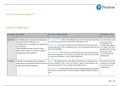
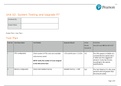
Component Description Key Terms / Points explained Connectivity / Ports
Motherboar A motherboard is what all the components ATX, mATX & ITX – These are the different sizes of the motherboard depending The connections on the
d connect to either directly on the on which size you get you can add more components or less. ports vary on the
motherboard or connected via a cable/wire motherboard. You
Socket Type – The socket is where the CPU attaches to and the socket type normally have USB 2.0 or
of some sort. must be the same on the motherboard and on the motherboard otherwise they 3.0, HDMI, VGA, DVI or
The motherboard also comes in many won’t be compatible. display ports. You also
sizes which means it can have a range of
have some audio
components connected to it. Front Side Bus – This is a physical connection that connects the processor to
connections and an
the other components in the computer e.g. RAM, HDD and PCI slots, the FSB
ethernet port.
runs at around 400-MHz or newer systems 800-MHz.
Processor The CPU is the brains of the computer it Cores – This determines how many tasks the computer can complete at one The CPU has a socket
tells all the components to follow the set of time for example if it has 1 core it can only do 1 task at a time whereas if you connection which allows it
instructions given by the user. have more cores then it can complete more tasks at once. to connect onto the
motherboard.
Clock Speed – The clock speed is the number of pulses generated which sets
the tempo for the processor. The clock speed is normally measured in MHz or
GHz.
Page 1 of 5
, Component Description Key Terms / Points explained Connectivity / Ports
Hyperthreading – This is where the CPU core makes the OS believe that there
are 2 CPU cores but there is only 1 physical CPU core and it only has 1 set of
execution resources.
Turboboost – This is where the CPU runs at the speed it needs to and when
the program needs more power it automatically reconfigures itself to perform
the extra cycles it needs to run the program.
Memory The memory is also referred to as RAM, DDR – Double Data Rate: This is integrated circuits used in computers. The RAM connects onto the
which is a temporary storage place when different DDR’s determine which can fit on the motherboard as they have the motherboard onto the
the computer is turned on but once the indent on different parts of the chip, this helps determine whether its DDR1, DIMM slot.
DDR2, DDR3 or DDR4.
computer is turned off the RAM wipes its
self-clean of data.
Hard disk The HDD or SSD is permanent storage SSD vs Rotational – An SSD drive is able to read and write onto the disc a lot The HDD is connected to
within the PC it is were all data is stored. faster compared to a HDD, however the price range for SSD’s are very the motherboard using a
expensive compared to normal HDD. HDD’s are very affordable but they aren’t SATA cable.
as fast retrieving the data however they are great when you need to have an
extra storage space or back-up drive.
RPM - Revolutions per minute, this is how fast the disk spins and the quicker
it spins the faster the data can be retrieved.
Graphics The graphics card is connected directly Dedicated vs Integrated – An integrated graphics card is where it is built into The graphics card
card onto the motherboard and the job of the the motherboard, so add-on card is not needed. A dedicated graphics card is connects to the
graphics card is to render the image on an add-on card where you install it onto the motherboard. motherboard on the PCI-E
your monitor. The better the graphics card slot.
the smoother image on your screen.
Page 2 of 5
Internal Components
Component Description Key Terms / Points explained Connectivity / Ports
Motherboar A motherboard is what all the components ATX, mATX & ITX – These are the different sizes of the motherboard depending The connections on the
d connect to either directly on the on which size you get you can add more components or less. ports vary on the
motherboard or connected via a cable/wire motherboard. You
Socket Type – The socket is where the CPU attaches to and the socket type normally have USB 2.0 or
of some sort. must be the same on the motherboard and on the motherboard otherwise they 3.0, HDMI, VGA, DVI or
The motherboard also comes in many won’t be compatible. display ports. You also
sizes which means it can have a range of
have some audio
components connected to it. Front Side Bus – This is a physical connection that connects the processor to
connections and an
the other components in the computer e.g. RAM, HDD and PCI slots, the FSB
ethernet port.
runs at around 400-MHz or newer systems 800-MHz.
Processor The CPU is the brains of the computer it Cores – This determines how many tasks the computer can complete at one The CPU has a socket
tells all the components to follow the set of time for example if it has 1 core it can only do 1 task at a time whereas if you connection which allows it
instructions given by the user. have more cores then it can complete more tasks at once. to connect onto the
motherboard.
Clock Speed – The clock speed is the number of pulses generated which sets
the tempo for the processor. The clock speed is normally measured in MHz or
GHz.
Page 1 of 5
, Component Description Key Terms / Points explained Connectivity / Ports
Hyperthreading – This is where the CPU core makes the OS believe that there
are 2 CPU cores but there is only 1 physical CPU core and it only has 1 set of
execution resources.
Turboboost – This is where the CPU runs at the speed it needs to and when
the program needs more power it automatically reconfigures itself to perform
the extra cycles it needs to run the program.
Memory The memory is also referred to as RAM, DDR – Double Data Rate: This is integrated circuits used in computers. The RAM connects onto the
which is a temporary storage place when different DDR’s determine which can fit on the motherboard as they have the motherboard onto the
the computer is turned on but once the indent on different parts of the chip, this helps determine whether its DDR1, DIMM slot.
DDR2, DDR3 or DDR4.
computer is turned off the RAM wipes its
self-clean of data.
Hard disk The HDD or SSD is permanent storage SSD vs Rotational – An SSD drive is able to read and write onto the disc a lot The HDD is connected to
within the PC it is were all data is stored. faster compared to a HDD, however the price range for SSD’s are very the motherboard using a
expensive compared to normal HDD. HDD’s are very affordable but they aren’t SATA cable.
as fast retrieving the data however they are great when you need to have an
extra storage space or back-up drive.
RPM - Revolutions per minute, this is how fast the disk spins and the quicker
it spins the faster the data can be retrieved.
Graphics The graphics card is connected directly Dedicated vs Integrated – An integrated graphics card is where it is built into The graphics card
card onto the motherboard and the job of the the motherboard, so add-on card is not needed. A dedicated graphics card is connects to the
graphics card is to render the image on an add-on card where you install it onto the motherboard. motherboard on the PCI-E
your monitor. The better the graphics card slot.
the smoother image on your screen.
Page 2 of 5