Chapter 4: Software
Cambridge IGCSE® / O Level Computer Science ()
Detailed Study Notes System & Application Software Exam Questions & Mark Schemes
1. Types of Software
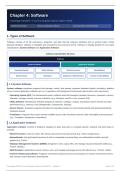
Software consists of all the instructions, programs, and data that tell computer hardware how to perform tasks. Unlike
physical hardware, software is intangible and executed by the processor (CPU). Software is broadly divided into two major
classifications: System Software and Application Software.
Software Classification Structure
Software
System Software Application Software
Operating System Utility Software Word Processors Spreadsheets
Device Drivers Translators Databases / Web Browsers Control & Video Editing
1.1 System Software
System software comprises programs that manage, control, and operate computer hardware directly, providing a platform
on top of which application software can run. It operates in the background continuously without direct user intervention.
• Operating System (OS): The fundamental system software suite that manages hardware resources, processes, memory
allocation, storage, security, and user interfaces (e.g., Windows, macOS, Linux, Android, iOS).
• Utility Software: Maintenance software designed to optimize, configure, analyze, and protect system security and disk
performance (e.g., Antivirus, Disk Defragmenter, Compression, Backup).
• Device Drivers: Translator programs that allow the Operating System to communicate directly with physical peripheral
hardware devices.
• Translators: Programs that convert human-readable source code into binary machine code executable by the processor
(e.g., Compilers, Interpreters, Assemblers).
1.2 Application Software
Application software consists of programs designed to allow end-users to complete specific, practical real-world tasks or
activities.
• Word Processors: Used to create, edit, format, and structure text documents (e.g., Word, Google Docs).
• Spreadsheets: Use grid-based structures of cells to manipulate numerical data, run mathematical models, and plot
graphs (e.g., Excel).
• Database Management Systems (DBMS): Designed to store, query, filter, and manage structured datasets safely (e.g.,
Access, MySQL).
• Web Browsers: Applications used to retrieve, view, and navigate web pages across the internet (e.g., Chrome, Safari).
• Control & Measuring Software: Programs connected to physical sensors and actuators to monitor environment metrics
and execute control operations automatically.
Cambridge IGCSE / O Level Computer Science (2210/0478) — Chapter 4 Page 1 of 6
, Comparison
System Software Application Software
Dimension
Primary Purpose Manages system hardware & provides operational Allows end-users to perform specific tasks.
platform.
Execution Level Runs continuously in the background automatically. Opened and operated directly by the user as
needed.
Dependency Independent; starts running when system boots up. Requires an Operating System to execute.
Examples Operating System, Drivers, Antivirus, Translators. Word Processors, Spreadsheets, Web Browsers,
Games.
2. Functions of the Operating System
The Operating System acts as an intermediary layer between hardware components and user applications, hiding hardware
complexity while ensuring efficient resource distribution.
2.1 Core Management Functions
1. Memory Management
• RAM Allocation: Dynamically assigns memory block addresses to active programs when launched and frees memory
when closed.
• Virtual Memory (Paging): When physical RAM fills up, the OS uses virtual memory on secondary storage (HDD/SSD).
Data is divided into fixed-size pages; inactive pages are moved from RAM to secondary storage to free up RAM, and
swapped back when needed.
2. Processor Management & Multitasking
• CPU Time Scheduling: Allocates small time slices (microseconds) to concurrent processes using scheduling algorithms.
• Multitasking: Switches execution between multiple tasks so rapidly that they appear to run simultaneously to the user.
3. Peripheral & Device Management
• Driver Interaction: Uses specific device drivers to send precise low-level hardware commands to input/output devices.
• Spooling: Stores incoming or outgoing peripheral requests in temporary storage queues (e.g., print queue) so high-speed
CPUs do not have to wait for slow hardware peripherals.
4. Interrupt Handling
Detects signals from hardware or software, pauses current execution, saves register states, routes execution to an Interrupt
Service Routine (ISR), and resumes paused tasks after handling.
5. File Management
Organizes physical drive storage into structured directories (folders), tracks file allocation locations (FAT/NTFS), and
manages access rights (Read, Write, Execute).
6. User Security Management
Controls individual user login credentials, authentication, permissions, and prevents unauthorized system access.
3. Interrupts
An interrupt is a signal sent to the CPU by hardware or software requesting immediate processing attention, temporarily
pausing the current program flow.
Cambridge IGCSE / O Level Computer Science (2210/0478) — Chapter 4 Page 2 of 6
Cambridge IGCSE® / O Level Computer Science ()
Detailed Study Notes System & Application Software Exam Questions & Mark Schemes
1. Types of Software
Software consists of all the instructions, programs, and data that tell computer hardware how to perform tasks. Unlike
physical hardware, software is intangible and executed by the processor (CPU). Software is broadly divided into two major
classifications: System Software and Application Software.
Software Classification Structure
Software
System Software Application Software
Operating System Utility Software Word Processors Spreadsheets
Device Drivers Translators Databases / Web Browsers Control & Video Editing
1.1 System Software
System software comprises programs that manage, control, and operate computer hardware directly, providing a platform
on top of which application software can run. It operates in the background continuously without direct user intervention.
• Operating System (OS): The fundamental system software suite that manages hardware resources, processes, memory
allocation, storage, security, and user interfaces (e.g., Windows, macOS, Linux, Android, iOS).
• Utility Software: Maintenance software designed to optimize, configure, analyze, and protect system security and disk
performance (e.g., Antivirus, Disk Defragmenter, Compression, Backup).
• Device Drivers: Translator programs that allow the Operating System to communicate directly with physical peripheral
hardware devices.
• Translators: Programs that convert human-readable source code into binary machine code executable by the processor
(e.g., Compilers, Interpreters, Assemblers).
1.2 Application Software
Application software consists of programs designed to allow end-users to complete specific, practical real-world tasks or
activities.
• Word Processors: Used to create, edit, format, and structure text documents (e.g., Word, Google Docs).
• Spreadsheets: Use grid-based structures of cells to manipulate numerical data, run mathematical models, and plot
graphs (e.g., Excel).
• Database Management Systems (DBMS): Designed to store, query, filter, and manage structured datasets safely (e.g.,
Access, MySQL).
• Web Browsers: Applications used to retrieve, view, and navigate web pages across the internet (e.g., Chrome, Safari).
• Control & Measuring Software: Programs connected to physical sensors and actuators to monitor environment metrics
and execute control operations automatically.
Cambridge IGCSE / O Level Computer Science (2210/0478) — Chapter 4 Page 1 of 6
, Comparison
System Software Application Software
Dimension
Primary Purpose Manages system hardware & provides operational Allows end-users to perform specific tasks.
platform.
Execution Level Runs continuously in the background automatically. Opened and operated directly by the user as
needed.
Dependency Independent; starts running when system boots up. Requires an Operating System to execute.
Examples Operating System, Drivers, Antivirus, Translators. Word Processors, Spreadsheets, Web Browsers,
Games.
2. Functions of the Operating System
The Operating System acts as an intermediary layer between hardware components and user applications, hiding hardware
complexity while ensuring efficient resource distribution.
2.1 Core Management Functions
1. Memory Management
• RAM Allocation: Dynamically assigns memory block addresses to active programs when launched and frees memory
when closed.
• Virtual Memory (Paging): When physical RAM fills up, the OS uses virtual memory on secondary storage (HDD/SSD).
Data is divided into fixed-size pages; inactive pages are moved from RAM to secondary storage to free up RAM, and
swapped back when needed.
2. Processor Management & Multitasking
• CPU Time Scheduling: Allocates small time slices (microseconds) to concurrent processes using scheduling algorithms.
• Multitasking: Switches execution between multiple tasks so rapidly that they appear to run simultaneously to the user.
3. Peripheral & Device Management
• Driver Interaction: Uses specific device drivers to send precise low-level hardware commands to input/output devices.
• Spooling: Stores incoming or outgoing peripheral requests in temporary storage queues (e.g., print queue) so high-speed
CPUs do not have to wait for slow hardware peripherals.
4. Interrupt Handling
Detects signals from hardware or software, pauses current execution, saves register states, routes execution to an Interrupt
Service Routine (ISR), and resumes paused tasks after handling.
5. File Management
Organizes physical drive storage into structured directories (folders), tracks file allocation locations (FAT/NTFS), and
manages access rights (Read, Write, Execute).
6. User Security Management
Controls individual user login credentials, authentication, permissions, and prevents unauthorized system access.
3. Interrupts
An interrupt is a signal sent to the CPU by hardware or software requesting immediate processing attention, temporarily
pausing the current program flow.
Cambridge IGCSE / O Level Computer Science (2210/0478) — Chapter 4 Page 2 of 6