Chapter 2
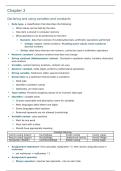
Declaring and using variables and constants
Data type- a classification that describes the following:
What values can be held by the item
How item is stored in computer memory
What operations can be performed on the item
Numeric- data that consists of numbers/decimals, arithmetic operations performed
Integer values- whole numbers / Floating point values (real numbers) -
decimal numbers
String- data items that are non-numeric, cannot be used in arithmetic operations
Numeric constant -Contains numbers that does not change
String constant (Alphanumeric values) - Enclosed in quotation marks, contains characters
and numbers
Variable -named memory locations, content can vary
Numeric variable- holds digits, performs mathematical operations
String variable- holds text, letter, special characters
Declaration is a statement that provides a variable's:
Data type
Identifier (variable’s name)
Optionally, an initial value
Type-safety -Prevents assigning values of an incorrect data type
Identifier- variable name
Choose reasonable and descriptive name for variables
Most languages allow letters and digits
Some languages allow hyphens
Reserved keywords are not allowed (num/string)
Variable names- case sensitive
Must be one word
Must start with a letter
Should have appropriate meaning
Variable Naming
Camel casing (lower) hourlyWage Snake casing hourly_wage
Pascal casing (upper) HourlyWage Underscore casing Hourly_Wage
Hungarian notation numHourlyWage Kebob casing hourly-wage
Assignment statement- first calculates myNumber * 2, then stores computed value in
myAnswer
set myAnswer = myNumber * 2
Assignment operator
Binary operator- requires two operands - one on each side
, Operates from right to left, right-associativity or right-to-left associativity
The result to the left of an assignment operator is called a Lvalue
Initializing the variable - declare a starting value, variables must be declared before used in
program
num yourSalary = 14.55 / num yourSalary
string yourName = “Janita” / string yourName
Garbage – a variable’s unknown value, till it is given a value (input yourSalary)
Named constant- Uppercase with underscores
Can be assigned a value only once
Assign a useful name to a value that will never be changed during a program’s execution,
or change once to change all instances
Magic number
Unnamed constant
Use taxAmount = price * SALES_TAX_AMOUNT instead of taxAmount = price * .06 (magic
number)
Performing arithmetic operations
Standard arithmetic operators:
+ (plus sign)- addition * (asterisk)- multiplication = (equal)- assignment
− (minus sign)- / (slash)- division
subtraction
Rules of precedence (Order of operations)
Parenthesis
Dictate the order in which operations in the same statement are Multiplication and
carried out Division
Addition and
All the arithmetic operators have left-to-right associativity
subtraction
Dividing an integer by another integer is a special case
Dividing two integers results in an integer, and any fractional part of the result is lost
The decimal portion of the result is cut off, or truncated
A remainder operator (modulo operator/ modulus operator) contains remainder of a
division operation
24 Mod 10 is 4, Because when 24 is divided by 10, 4 is the remainder
The advantages of modularization
Modules -Subunit of programming problem (subroutines, procedures, functions, or methods)
Call a module is to use its name to invoke the module, causing it to execute
Modularization -Breaking down a large program into modules (functional
decomposition)
Abstraction
Paying attention to important properties while ignoring nonessential details
One broad statement corresponds to dozens of machine instructions
Multiple programmers can work on one problem
Declaring and using variables and constants
Data type- a classification that describes the following:
What values can be held by the item
How item is stored in computer memory
What operations can be performed on the item
Numeric- data that consists of numbers/decimals, arithmetic operations performed
Integer values- whole numbers / Floating point values (real numbers) -
decimal numbers
String- data items that are non-numeric, cannot be used in arithmetic operations
Numeric constant -Contains numbers that does not change
String constant (Alphanumeric values) - Enclosed in quotation marks, contains characters
and numbers
Variable -named memory locations, content can vary
Numeric variable- holds digits, performs mathematical operations
String variable- holds text, letter, special characters
Declaration is a statement that provides a variable's:
Data type
Identifier (variable’s name)
Optionally, an initial value
Type-safety -Prevents assigning values of an incorrect data type
Identifier- variable name
Choose reasonable and descriptive name for variables
Most languages allow letters and digits
Some languages allow hyphens
Reserved keywords are not allowed (num/string)
Variable names- case sensitive
Must be one word
Must start with a letter
Should have appropriate meaning
Variable Naming
Camel casing (lower) hourlyWage Snake casing hourly_wage
Pascal casing (upper) HourlyWage Underscore casing Hourly_Wage
Hungarian notation numHourlyWage Kebob casing hourly-wage
Assignment statement- first calculates myNumber * 2, then stores computed value in
myAnswer
set myAnswer = myNumber * 2
Assignment operator
Binary operator- requires two operands - one on each side
, Operates from right to left, right-associativity or right-to-left associativity
The result to the left of an assignment operator is called a Lvalue
Initializing the variable - declare a starting value, variables must be declared before used in
program
num yourSalary = 14.55 / num yourSalary
string yourName = “Janita” / string yourName
Garbage – a variable’s unknown value, till it is given a value (input yourSalary)
Named constant- Uppercase with underscores
Can be assigned a value only once
Assign a useful name to a value that will never be changed during a program’s execution,
or change once to change all instances
Magic number
Unnamed constant
Use taxAmount = price * SALES_TAX_AMOUNT instead of taxAmount = price * .06 (magic
number)
Performing arithmetic operations
Standard arithmetic operators:
+ (plus sign)- addition * (asterisk)- multiplication = (equal)- assignment
− (minus sign)- / (slash)- division
subtraction
Rules of precedence (Order of operations)
Parenthesis
Dictate the order in which operations in the same statement are Multiplication and
carried out Division
Addition and
All the arithmetic operators have left-to-right associativity
subtraction
Dividing an integer by another integer is a special case
Dividing two integers results in an integer, and any fractional part of the result is lost
The decimal portion of the result is cut off, or truncated
A remainder operator (modulo operator/ modulus operator) contains remainder of a
division operation
24 Mod 10 is 4, Because when 24 is divided by 10, 4 is the remainder
The advantages of modularization
Modules -Subunit of programming problem (subroutines, procedures, functions, or methods)
Call a module is to use its name to invoke the module, causing it to execute
Modularization -Breaking down a large program into modules (functional
decomposition)
Abstraction
Paying attention to important properties while ignoring nonessential details
One broad statement corresponds to dozens of machine instructions
Multiple programmers can work on one problem