Image processing by convolution using kernel matrices
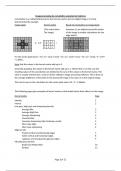
Convolution is a mathematical process that can be used to process digital images. It is best
demonstrated by example.
Image pixels Kernel matrix Result of convolution on image pixels
(This matrix blurs (Assumes 1s are added around the border
The image) of the image to enable calculations for the
edge pixels.)
1 1 1 1 1 1 1.3 1.3 1.3 1
1 1 4 1 1 1 1 1 1.3 2 2.3 2 1.3
1/9 =
1 4 4 4 1 1 1 1 1.3 2.3 2.6 2.3 1.3
1 1 4 1 1 1 1 1 1.3 2 2.3 2 1.3
1 1 1 1 1 1 1.3 1.3 1.3 1
For the centre pixel [(1x1) + (4 x 1) + (1x1) + (1x4) + (4 x 1) + (1x4) + (1x1) + (4 x 1) + (1x1)] / 9 = 24/9
= 2.6666…
Note that the values in the kernel matrix add up to 9.
Generally speaking, the values in the kernel matrix add up to 1. Where this is not the case the
resulting values of the convolution are divided by the sum of the values in the kernel matrix. This
value is usually entered into a scale or divisor setting in image processing software. This is done so
the average brightness of the pixels in the processed image is the same as in the original image.
This can be seen in the calculation for the centre pixel where = 2.66666…
The following pages give examples of kernel matrices with details about their effects on the image.
Kernel matrix Page
Identity 2
Inverse 2
Low pass, high pass and sharpening kernels
Average Blur 3
Average High Pass 3
Average Sharpening 4
Gaussian Blur 5
Gaussian sharpening (aka Unsharpen mask) 5
Sharr type edge 6
Sharr type sharpening 6
Edge kernels
Prewitt vertical and horizontal edges 7
Sobel vertical and horizontal edges 8
Laplacian and Compound Laplacian edges 9
Miscellaneous kernels
Radial and Motion Blur 10
Emboss 11
Page 1 of 11
, The Identity matrix
The effect of this matrix does not change the image.
Identity matrix 3 x 3 Identity matrix 5 x 5
0 0 0 0 0 0 0 0
0 1 0 0 0 0 0 0
0 0 0 0 0 1 0 0
0 0 0 0 0
0 0 0 0 0
Additional settings for Photoshop elements v 5.0
Scale 1 Offset 0 Scale 1 Offset 0
*Additional settings for GIMP 3.0.4 if normalize is not selected
Divisor 1 Offset 0 Divisor 1 Offset 0
(*Note these can only be changed if the normalize box is not ticked. If the box is ticked GIMP
calculates suitable values)
The Inverse matrix
The effect of this matrix is to create a negative of the image.
Inverse 3 x 3 Inverse 5 x 5
0 0 0 0 0 0 0 0
0 -1 0 0 0 0 0 0
0 0 0 0 0 -1 0 0
0 0 0 0 0
0 0 0 0 0
Additional settings for Photoshop elements v 5.0
Scale 1 Offset 256 Scale 1 Offset 256
“Additional settings for GIMP 3.0.4 if normalize is not selected
Divisor 1 Offset 0.500 Divisor 1 Offset 0.500
*The normalize and alpha channel are not ticked.
If the normalize is ticked then the alpha channel should not be ticked for this filter.
Offset setting
The offset setting above is used to add a set amount to each pixel value. In this case it ensures the
values are not negative. For example, an original image value of 64 becomes -64. Adding the offset
value of 256 to it changes it to the final positive value of 192.
A similar effect is achieved in GIMP using an offset value of 0.500.
Page 2 of 11
Convolution is a mathematical process that can be used to process digital images. It is best
demonstrated by example.
Image pixels Kernel matrix Result of convolution on image pixels
(This matrix blurs (Assumes 1s are added around the border
The image) of the image to enable calculations for the
edge pixels.)
1 1 1 1 1 1 1.3 1.3 1.3 1
1 1 4 1 1 1 1 1 1.3 2 2.3 2 1.3
1/9 =
1 4 4 4 1 1 1 1 1.3 2.3 2.6 2.3 1.3
1 1 4 1 1 1 1 1 1.3 2 2.3 2 1.3
1 1 1 1 1 1 1.3 1.3 1.3 1
For the centre pixel [(1x1) + (4 x 1) + (1x1) + (1x4) + (4 x 1) + (1x4) + (1x1) + (4 x 1) + (1x1)] / 9 = 24/9
= 2.6666…
Note that the values in the kernel matrix add up to 9.
Generally speaking, the values in the kernel matrix add up to 1. Where this is not the case the
resulting values of the convolution are divided by the sum of the values in the kernel matrix. This
value is usually entered into a scale or divisor setting in image processing software. This is done so
the average brightness of the pixels in the processed image is the same as in the original image.
This can be seen in the calculation for the centre pixel where = 2.66666…
The following pages give examples of kernel matrices with details about their effects on the image.
Kernel matrix Page
Identity 2
Inverse 2
Low pass, high pass and sharpening kernels
Average Blur 3
Average High Pass 3
Average Sharpening 4
Gaussian Blur 5
Gaussian sharpening (aka Unsharpen mask) 5
Sharr type edge 6
Sharr type sharpening 6
Edge kernels
Prewitt vertical and horizontal edges 7
Sobel vertical and horizontal edges 8
Laplacian and Compound Laplacian edges 9
Miscellaneous kernels
Radial and Motion Blur 10
Emboss 11
Page 1 of 11
, The Identity matrix
The effect of this matrix does not change the image.
Identity matrix 3 x 3 Identity matrix 5 x 5
0 0 0 0 0 0 0 0
0 1 0 0 0 0 0 0
0 0 0 0 0 1 0 0
0 0 0 0 0
0 0 0 0 0
Additional settings for Photoshop elements v 5.0
Scale 1 Offset 0 Scale 1 Offset 0
*Additional settings for GIMP 3.0.4 if normalize is not selected
Divisor 1 Offset 0 Divisor 1 Offset 0
(*Note these can only be changed if the normalize box is not ticked. If the box is ticked GIMP
calculates suitable values)
The Inverse matrix
The effect of this matrix is to create a negative of the image.
Inverse 3 x 3 Inverse 5 x 5
0 0 0 0 0 0 0 0
0 -1 0 0 0 0 0 0
0 0 0 0 0 -1 0 0
0 0 0 0 0
0 0 0 0 0
Additional settings for Photoshop elements v 5.0
Scale 1 Offset 256 Scale 1 Offset 256
“Additional settings for GIMP 3.0.4 if normalize is not selected
Divisor 1 Offset 0.500 Divisor 1 Offset 0.500
*The normalize and alpha channel are not ticked.
If the normalize is ticked then the alpha channel should not be ticked for this filter.
Offset setting
The offset setting above is used to add a set amount to each pixel value. In this case it ensures the
values are not negative. For example, an original image value of 64 becomes -64. Adding the offset
value of 256 to it changes it to the final positive value of 192.
A similar effect is achieved in GIMP using an offset value of 0.500.
Page 2 of 11