TOON BOOM STORYBOARD PRO EXAM
100% SOLVED.
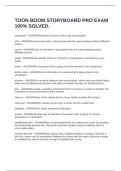
storyboard - ANSWERillustrated version of the script in production
shot - ANSWERused in live-action, many panels with the same background but different
actions
scene - ANSWERused in animation, many panels with the same background but
different actions
panel - ANSWERone specific action or moment in a storyboard; one drawing is one
panel
action - ANSWERthe movement that is going on at the moment in the storyboard
action notes - ANSWERextra information to explain what is taking place in the
storyboard
dissolve - ANSWERa transition between two scenes/shots, where one scene/shot fades
away and simultaneously another shot fades in; default transition in Storyboard Pro
pan - ANSWERa steady, sweeping movement from one point in a scene to another; the
horizontal or vertical movement of the camera
zoom in - ANSWERuse of the camera lens to move closely towards the subject
zoom out - ANSWERthe camera moves from a closer shot to a wider shot
dialogue - ANSWERthe words spoken by characters
arrows - ANSWERa clear way to indicate to the viewer what is going on; shows
perspective in movement
establishing shot - ANSWERlays the groundwork for the context of a scene by showing
the relationship between the characters and their location; used to indicate where a
scene takes place
medium full shot - ANSWERaka cowboy shot; halfway between a medium shot and a
full shot; frame cuts off somewhere between the knees and the waist; still wide enough
to establish the scene, but wide enough to establish the scene
, camera moves - ANSWERused to direct the audience to the important part of your
scene
script - ANSWERa written work outlining the dialogue, action, background, characters,
emotions, movements, etc.
scene evaluation - ANSWERdetermine the important elements of each scene: camera
movement, direction of movement of objects, etc.
scene list - ANSWERdetails of each scene's type and angle, camera effects, lighting,
and accompanying dialogue
animatic - ANSWERa preliminary form of a film or other video, consisting of a series of
drawings with audio
keyframe - ANSWERthe beginning and ending of each new action
thumbnail view - ANSWERdisplays the panels of your project in chronological order;
allows you to rearrange panels and scenes
timeline view - ANSWERthe location on the Storyboard Pro workspace where you
assemble the timing of your scene's visuals and sounds
scrubbing - ANSWERmanually moving the playhead over the timeline to preview an
animation or movement
Tools toolbar - ANSWERcontains all the main tools you need to work in Storyboard Pro
Tool Properties (Properties panel) - ANSWERview which displays a tool's properties
and allows you to customize them
duration - ANSWERthe amount of elapsed time between two events
background - ANSWERthe part of a scene that is farthest to the rear
layer - ANSWERan individual column, level or character; a scene's layers are
superimposed to form the final image
rendering - ANSWERthe final step when animating by computer in which the computer
takes each pixel that appears on screen and processes all of the components, as well
as adding motion blur before it produces a final image
tablet - ANSWERa device used in conjunction with, or instead of, a mouse to move a
mouse pointer/cursor around the computer screen
camera tool - ANSWERtool used to animate the camera using keyframes
100% SOLVED.
storyboard - ANSWERillustrated version of the script in production
shot - ANSWERused in live-action, many panels with the same background but different
actions
scene - ANSWERused in animation, many panels with the same background but
different actions
panel - ANSWERone specific action or moment in a storyboard; one drawing is one
panel
action - ANSWERthe movement that is going on at the moment in the storyboard
action notes - ANSWERextra information to explain what is taking place in the
storyboard
dissolve - ANSWERa transition between two scenes/shots, where one scene/shot fades
away and simultaneously another shot fades in; default transition in Storyboard Pro
pan - ANSWERa steady, sweeping movement from one point in a scene to another; the
horizontal or vertical movement of the camera
zoom in - ANSWERuse of the camera lens to move closely towards the subject
zoom out - ANSWERthe camera moves from a closer shot to a wider shot
dialogue - ANSWERthe words spoken by characters
arrows - ANSWERa clear way to indicate to the viewer what is going on; shows
perspective in movement
establishing shot - ANSWERlays the groundwork for the context of a scene by showing
the relationship between the characters and their location; used to indicate where a
scene takes place
medium full shot - ANSWERaka cowboy shot; halfway between a medium shot and a
full shot; frame cuts off somewhere between the knees and the waist; still wide enough
to establish the scene, but wide enough to establish the scene
, camera moves - ANSWERused to direct the audience to the important part of your
scene
script - ANSWERa written work outlining the dialogue, action, background, characters,
emotions, movements, etc.
scene evaluation - ANSWERdetermine the important elements of each scene: camera
movement, direction of movement of objects, etc.
scene list - ANSWERdetails of each scene's type and angle, camera effects, lighting,
and accompanying dialogue
animatic - ANSWERa preliminary form of a film or other video, consisting of a series of
drawings with audio
keyframe - ANSWERthe beginning and ending of each new action
thumbnail view - ANSWERdisplays the panels of your project in chronological order;
allows you to rearrange panels and scenes
timeline view - ANSWERthe location on the Storyboard Pro workspace where you
assemble the timing of your scene's visuals and sounds
scrubbing - ANSWERmanually moving the playhead over the timeline to preview an
animation or movement
Tools toolbar - ANSWERcontains all the main tools you need to work in Storyboard Pro
Tool Properties (Properties panel) - ANSWERview which displays a tool's properties
and allows you to customize them
duration - ANSWERthe amount of elapsed time between two events
background - ANSWERthe part of a scene that is farthest to the rear
layer - ANSWERan individual column, level or character; a scene's layers are
superimposed to form the final image
rendering - ANSWERthe final step when animating by computer in which the computer
takes each pixel that appears on screen and processes all of the components, as well
as adding motion blur before it produces a final image
tablet - ANSWERa device used in conjunction with, or instead of, a mouse to move a
mouse pointer/cursor around the computer screen
camera tool - ANSWERtool used to animate the camera using keyframes