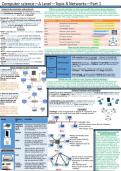
Computer science—A Level—Topic 8 Networks—Part 1
Network characteristics and protocols What is a network and why are they more useful than stand-alone computers?
A computer not connected to anything is known A network is when you have more than one device connected to each other, otherwise
as a standalone computer, as soon as you connect this is known as a stand-alone computer. The reason why networks are more useful is be-
it to another device you have a network. cause it allows users to share files / peripherals / communication with one another instead
of having to transfer files using a storage medium etc.
Standards are vital to computer science as:
•They are a set of hardware and software specifi-
cations that allow manufacturers to create prod-
ucts and services that are compatible with each
other.—without standards, a device couldn't
communicate with another.
Protocols
•TCP—provides an error-free transmission between
2 routers.
•IP—routes packets across a wide area network.
•UDP—alternative to TCP with no error checking,
used to send messages where speed is more im-
portant than accuracy.
•HTTP—a way for the client and server to send/
receive requests and deliver HTML webpages.
•HTTPS—Adds authentication and encryption to What are the features of a protocol?
HTTP. Protocols are here to ensure that technology based standards are established to allow com-
•FTP—allows computers to transfer files on a WAN. munication between devices across a network. For example they allow for web page re-
•SMTP—transfers outgoing emails between servers quests, File transfers and for emails to be sent to different devices using different protocols.
and from email clients to servers..
•POP—receives emails from the mail server and Advantages •File security easier to manage. •Easier to install soft-
Client ware updates to all computers and backup shared data.
then delivers them to your devices.
•IMAP—keeps emails on the mail server, maintain- Disadvantages •Expensive to set up. •requires IT specialist to maintain.
ing synchronicity between devices. •Server is single point of failure, users will lose access if
server fails.
Client and peer-to-peer networks
A client server is a Peer-to- Advantages •Easy to maintain. •Does not require IT specialist.
method of network •Cheaper. •No dependency on a single computer.
organisation in which Peer
network stations make Disadvantages •Less secure. •Users need to backup their own files.
use of resources availa- •Can be difficult to maintain a well-ordered file store.
ble at one or more
servers. Should you use a client or peer-to-peer network topology?
If you’re at home, your network topology should be peer-to-peer as at your home you
Usage: for a large or- probably don’t have a large number of computers and also its cheaper and easier to
ganisation with a large maintain as you do not require an IT specialist. Client server is only used with a large or-
number of computers ganisation containing a large number of computers that all require the same information.
that need access to the
same information. Network hardware and topologies
A Peer-to-peer server A LAN (Local area network) is a network that covers a small geographical area typical-
is a method of network ly located on a single site.—all hardware is normally owned by the organisation using
organisation in which it, LANS connected via UTP cables, Fibre optics or Wi-Fi.
network stations can
share resources on A WAN (Wide area network) is a network that covers a
other network sta- large geographical area, it is an infrastructure than con-
tions. nects multiple LANs together. Often connected using
Usage: for a small or- telephone lines, satellites and fibre optics.
ganisation with fewer Topologies
computers or where
fewer users need ac- Topology is the arrangement or layout of a network, how
cess to the same infor- connections are made and how data is moved around.
mation.
Image What is Function
it?
•Single cable.
Network Receives and sends electri- •Performance issues due to collisions.
interface cal signals, required by all •Low security
card devices that are connected •No longer used.
(NIC) to a network.
Router Receives packets on a net- What hardware is used to
work and forwards them connect networks?
to the correct destinations •Most commonly used First every device connected
based on address. topology. must need a NIC however
•Central node (switch). these are commonly integrat-
WAP Wireless access points, ed into motherboards now, a
provides a WLAN to a •Fault tolerant router is then needed so that
home, connection distance •More expensive due to it can receive packets and
varies. more cables. forward them to devices con-
nected to it using a switch or
Switch Active device which allo- hub but hubs are not in use
cates data to the correct as much due to the unneces-
device connected to it. sary traffic it causes. Different
Hub Passive device which sends physical transmission medias
data to all devices con- •Each node is connected are used to connect devices
nected to the router caus- to every other node. together, twisted pair cable,
copper axial and fibre op-
ing unnecessary traffic. •Common in wireless net- tics—twisted pair is the
Trans- Connect devices together works. cheapest yet slowest and
mission and allow data transfer •No cabling costs. fibre optics is the fastest yet
media between each other. Fibre •Very fault tolerant ‘self- most expensive due to using
optics being the fastest. healing’. light reflections to transfer
data.
Network characteristics and protocols What is a network and why are they more useful than stand-alone computers?
A computer not connected to anything is known A network is when you have more than one device connected to each other, otherwise
as a standalone computer, as soon as you connect this is known as a stand-alone computer. The reason why networks are more useful is be-
it to another device you have a network. cause it allows users to share files / peripherals / communication with one another instead
of having to transfer files using a storage medium etc.
Standards are vital to computer science as:
•They are a set of hardware and software specifi-
cations that allow manufacturers to create prod-
ucts and services that are compatible with each
other.—without standards, a device couldn't
communicate with another.
Protocols
•TCP—provides an error-free transmission between
2 routers.
•IP—routes packets across a wide area network.
•UDP—alternative to TCP with no error checking,
used to send messages where speed is more im-
portant than accuracy.
•HTTP—a way for the client and server to send/
receive requests and deliver HTML webpages.
•HTTPS—Adds authentication and encryption to What are the features of a protocol?
HTTP. Protocols are here to ensure that technology based standards are established to allow com-
•FTP—allows computers to transfer files on a WAN. munication between devices across a network. For example they allow for web page re-
•SMTP—transfers outgoing emails between servers quests, File transfers and for emails to be sent to different devices using different protocols.
and from email clients to servers..
•POP—receives emails from the mail server and Advantages •File security easier to manage. •Easier to install soft-
Client ware updates to all computers and backup shared data.
then delivers them to your devices.
•IMAP—keeps emails on the mail server, maintain- Disadvantages •Expensive to set up. •requires IT specialist to maintain.
ing synchronicity between devices. •Server is single point of failure, users will lose access if
server fails.
Client and peer-to-peer networks
A client server is a Peer-to- Advantages •Easy to maintain. •Does not require IT specialist.
method of network •Cheaper. •No dependency on a single computer.
organisation in which Peer
network stations make Disadvantages •Less secure. •Users need to backup their own files.
use of resources availa- •Can be difficult to maintain a well-ordered file store.
ble at one or more
servers. Should you use a client or peer-to-peer network topology?
If you’re at home, your network topology should be peer-to-peer as at your home you
Usage: for a large or- probably don’t have a large number of computers and also its cheaper and easier to
ganisation with a large maintain as you do not require an IT specialist. Client server is only used with a large or-
number of computers ganisation containing a large number of computers that all require the same information.
that need access to the
same information. Network hardware and topologies
A Peer-to-peer server A LAN (Local area network) is a network that covers a small geographical area typical-
is a method of network ly located on a single site.—all hardware is normally owned by the organisation using
organisation in which it, LANS connected via UTP cables, Fibre optics or Wi-Fi.
network stations can
share resources on A WAN (Wide area network) is a network that covers a
other network sta- large geographical area, it is an infrastructure than con-
tions. nects multiple LANs together. Often connected using
Usage: for a small or- telephone lines, satellites and fibre optics.
ganisation with fewer Topologies
computers or where
fewer users need ac- Topology is the arrangement or layout of a network, how
cess to the same infor- connections are made and how data is moved around.
mation.
Image What is Function
it?
•Single cable.
Network Receives and sends electri- •Performance issues due to collisions.
interface cal signals, required by all •Low security
card devices that are connected •No longer used.
(NIC) to a network.
Router Receives packets on a net- What hardware is used to
work and forwards them connect networks?
to the correct destinations •Most commonly used First every device connected
based on address. topology. must need a NIC however
•Central node (switch). these are commonly integrat-
WAP Wireless access points, ed into motherboards now, a
provides a WLAN to a •Fault tolerant router is then needed so that
home, connection distance •More expensive due to it can receive packets and
varies. more cables. forward them to devices con-
nected to it using a switch or
Switch Active device which allo- hub but hubs are not in use
cates data to the correct as much due to the unneces-
device connected to it. sary traffic it causes. Different
Hub Passive device which sends physical transmission medias
data to all devices con- •Each node is connected are used to connect devices
nected to the router caus- to every other node. together, twisted pair cable,
copper axial and fibre op-
ing unnecessary traffic. •Common in wireless net- tics—twisted pair is the
Trans- Connect devices together works. cheapest yet slowest and
mission and allow data transfer •No cabling costs. fibre optics is the fastest yet
media between each other. Fibre •Very fault tolerant ‘self- most expensive due to using
optics being the fastest. healing’. light reflections to transfer
data.