// set the user interface layout for this activity
// the layout file is defined in the project res/layout/main_activity.xml file setContentView(R.layout.main_activity)
// initialize member TextView so we can manipulate it later
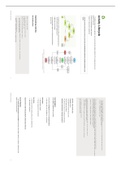
Activity Lifecycle
textView = findViewById(R.id.text_view)
}
// This callback is called only when there is a saved instance that is previously saved by using onSaveInstanceState().
→ The different states (that your application can move through) and callbacks helps the OS to manage resources and // We restore some state in onCreate(), while we can optionally restore other state here, possibly usable after onStart() has complete
// The savedInstanceState Bundle is same as the one used in onCreate().
application interrupts.
override fun onRestoreInstanceState(savedInstanceState: Bundle?) {
**KNOW & UNDERSTAND THESE STATES
textView.text = savedInstanceState?.getString(TEXT_VIEW_KEY)
}
** REFER TO SLIDES FOR EXAMPLES:
// invoked when the activity may be temporarily destroyed, save the instance state here
override fun onSaveInstanceState(outState: Bundle?) {
outState?.run {
https://s3-us-west-2.amazonaws.com/secure.notion-static.com/33dd8baf-86f3-4d89-bad4-7e08dae67ae2/MDD07-activit putString(GAME_STATE_KEY, gameState) putString(TEXT_VIEW_KEY, textView.text.toString())
ies.pdf }
// call superclass to save any view hierarchy
super.onSaveInstanceState(outState)
}
→ Extend the base activity class
→ Override functions
→ Only implement functions that you need
→ Call the super class method
→ Pay attention to what you re building and destroying
→ What part of the lifecycle is the app currently in?
Activity lifecycle methods are called automatically depending on
the OS needs and the stage they are in.
Initiate the UI in onCreate() User Navigation
Use onSaveInstanceState() and onRestoreInstanceState() to Handle Home and Back buttons gracefully
preserve state
It’s important to distinguish between the navigation buttons
Most users don’t know the difference – be gracious!
Interruptions: Lifecycle management is especially important
due to resource management constraints Home button
Calls onStop(), onStart()
The app is stopped but not destroyed
Implementing Activities
Back button
The Activity Class
Goes back to previous activity (unless you’ve overridden this)
Calls onStop(), onDestroy()
lateinit var textView: TextView
// some transient state for the activity instance Important when implementing multiple Activities (data retention)
var gameState: String? = null
override fun onCreate(savedInstanceState: Bundle?) {
// call the super class onCreate to complete the creation of activity like // the view hierarchy Screen Rotation
super.onCreate(savedInstanceState)
→ Your Activity will be destroyed and recreated each time the screen rotates. Needs to re-render & re-build the screen
// recovering the instance state based on the new screen layout.
gameState = savedInstanceState?.getString(GAME_STATE_KEY)
Activity Lifecycle 1 Activity Lifecycle 2
// the layout file is defined in the project res/layout/main_activity.xml file setContentView(R.layout.main_activity)
// initialize member TextView so we can manipulate it later
Activity Lifecycle
textView = findViewById(R.id.text_view)
}
// This callback is called only when there is a saved instance that is previously saved by using onSaveInstanceState().
→ The different states (that your application can move through) and callbacks helps the OS to manage resources and // We restore some state in onCreate(), while we can optionally restore other state here, possibly usable after onStart() has complete
// The savedInstanceState Bundle is same as the one used in onCreate().
application interrupts.
override fun onRestoreInstanceState(savedInstanceState: Bundle?) {
**KNOW & UNDERSTAND THESE STATES
textView.text = savedInstanceState?.getString(TEXT_VIEW_KEY)
}
** REFER TO SLIDES FOR EXAMPLES:
// invoked when the activity may be temporarily destroyed, save the instance state here
override fun onSaveInstanceState(outState: Bundle?) {
outState?.run {
https://s3-us-west-2.amazonaws.com/secure.notion-static.com/33dd8baf-86f3-4d89-bad4-7e08dae67ae2/MDD07-activit putString(GAME_STATE_KEY, gameState) putString(TEXT_VIEW_KEY, textView.text.toString())
ies.pdf }
// call superclass to save any view hierarchy
super.onSaveInstanceState(outState)
}
→ Extend the base activity class
→ Override functions
→ Only implement functions that you need
→ Call the super class method
→ Pay attention to what you re building and destroying
→ What part of the lifecycle is the app currently in?
Activity lifecycle methods are called automatically depending on
the OS needs and the stage they are in.
Initiate the UI in onCreate() User Navigation
Use onSaveInstanceState() and onRestoreInstanceState() to Handle Home and Back buttons gracefully
preserve state
It’s important to distinguish between the navigation buttons
Most users don’t know the difference – be gracious!
Interruptions: Lifecycle management is especially important
due to resource management constraints Home button
Calls onStop(), onStart()
The app is stopped but not destroyed
Implementing Activities
Back button
The Activity Class
Goes back to previous activity (unless you’ve overridden this)
Calls onStop(), onDestroy()
lateinit var textView: TextView
// some transient state for the activity instance Important when implementing multiple Activities (data retention)
var gameState: String? = null
override fun onCreate(savedInstanceState: Bundle?) {
// call the super class onCreate to complete the creation of activity like // the view hierarchy Screen Rotation
super.onCreate(savedInstanceState)
→ Your Activity will be destroyed and recreated each time the screen rotates. Needs to re-render & re-build the screen
// recovering the instance state based on the new screen layout.
gameState = savedInstanceState?.getString(GAME_STATE_KEY)
Activity Lifecycle 1 Activity Lifecycle 2