Ch1. The Internet
Ch2. The Internet protocol stack
Ch3. Web Servers
Ch4. HTML
Ch5. Apache and PHP
Ch6. Databases
Ch7. Databases and PHP
Ch8. Business Logic and JavaScript
Ch9. Security
Ch7. Databases and PHP
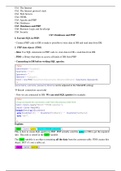
I. Execute SQL in PHP:
- Connect PHP code to DB to make it possible to store data in DB and read data from DB.
1. PHP data objects (PDO)
- Idea: Use SQL statements in PHP code to: store data in DB + read data from DB.
- PDO: a library that helps us access all kinds of DB from PHP.
- Connecting to DB before writing SQL queries:
<?php
$servername = "localhost";
$username = "root";
$password = "";
$dbname = "duskycars";
$conn = new PDO("mysql:host=$servername; dbname=$dbname", $username, $password);
?>
(servername, username, password, dbname can be adjusted in the MariaDB setting)
→ Result: connection successful
- Now we are connected to DB. We can send SQL queries for example:
<?php
//copy and paste the connection code from the previous slide here
$stmt = $conn->query("SELECT * FROM customer;");
$result = $stmt->fetchAll();
foreach($result as &$customer){
echo $customer['id'] . " " . $customer['firstName'] . " " . $customer['lastName'];
echo "<br>";
}
?>
Explain:
$stmt = $conn->query("SELECT * FROM customer;");
This is how to create SQL queries in PHP: PHP actually send the query to DB to get the required
info. This info is stored in the $stmt variable.
The $stmt variable is an object containing all the data from the customer table. PDO creates this
object. BUT it’s not a table yet.
$result = $stmt->fetchAll();
, The fetchAll() is a method that PDO provides. It returns an array containing
all of the result set rows ➔ simply: It returns all the data that is stored in
the $stmt object in form of a table (that can access with PHP code).
foreach($result as &$customer){
echo $customer['id'] . " " . $customer['firstName'] . " " . $customer['lastName'];
echo "<br>";
}
The foreach loop goes through table $result one line at a time, every lines.
The current line is called $customer. This means each iteration of the loop, variable $customer
contains a different row from the table.
Keyword echo is like print command, returns the data as String → HTML code is written.
With the bracket e.g. ['firstName'] we can specify the which data of the row to execute echo
command. Here we choose ['id'], ['firstName'], and ['lastName']. We don’t choose column
[‘password'].
The <br> is line breaker. The . operator concatenates two strings.
2. HTML and PHP
Remember we can add HTML code to PHP page.
<html>
<head>
<title>Connect to MariaDB Server</title>
</head>
<body>
<h3>Customers:</h3>
//add PHP code in the body of the HTML doc
</body>
</html>
3. Inserting data to DB
Quite similar to requesting data:
<?php
//copy and paste the connection code here
$sql = "INSERT INTO customer (firstName, lastName, password) VALUES ('Test', 'User', 'pw123');";
$conn->exec($sql);
echo "New customer registered successfully.";
?>
BUT this is just static way to insert data.
We want to connect PHP with HTML forms for user to fill data in.
Separate to HTML file and PHP code.
Ch2. The Internet protocol stack
Ch3. Web Servers
Ch4. HTML
Ch5. Apache and PHP
Ch6. Databases
Ch7. Databases and PHP
Ch8. Business Logic and JavaScript
Ch9. Security
Ch7. Databases and PHP
I. Execute SQL in PHP:
- Connect PHP code to DB to make it possible to store data in DB and read data from DB.
1. PHP data objects (PDO)
- Idea: Use SQL statements in PHP code to: store data in DB + read data from DB.
- PDO: a library that helps us access all kinds of DB from PHP.
- Connecting to DB before writing SQL queries:
<?php
$servername = "localhost";
$username = "root";
$password = "";
$dbname = "duskycars";
$conn = new PDO("mysql:host=$servername; dbname=$dbname", $username, $password);
?>
(servername, username, password, dbname can be adjusted in the MariaDB setting)
→ Result: connection successful
- Now we are connected to DB. We can send SQL queries for example:
<?php
//copy and paste the connection code from the previous slide here
$stmt = $conn->query("SELECT * FROM customer;");
$result = $stmt->fetchAll();
foreach($result as &$customer){
echo $customer['id'] . " " . $customer['firstName'] . " " . $customer['lastName'];
echo "<br>";
}
?>
Explain:
$stmt = $conn->query("SELECT * FROM customer;");
This is how to create SQL queries in PHP: PHP actually send the query to DB to get the required
info. This info is stored in the $stmt variable.
The $stmt variable is an object containing all the data from the customer table. PDO creates this
object. BUT it’s not a table yet.
$result = $stmt->fetchAll();
, The fetchAll() is a method that PDO provides. It returns an array containing
all of the result set rows ➔ simply: It returns all the data that is stored in
the $stmt object in form of a table (that can access with PHP code).
foreach($result as &$customer){
echo $customer['id'] . " " . $customer['firstName'] . " " . $customer['lastName'];
echo "<br>";
}
The foreach loop goes through table $result one line at a time, every lines.
The current line is called $customer. This means each iteration of the loop, variable $customer
contains a different row from the table.
Keyword echo is like print command, returns the data as String → HTML code is written.
With the bracket e.g. ['firstName'] we can specify the which data of the row to execute echo
command. Here we choose ['id'], ['firstName'], and ['lastName']. We don’t choose column
[‘password'].
The <br> is line breaker. The . operator concatenates two strings.
2. HTML and PHP
Remember we can add HTML code to PHP page.
<html>
<head>
<title>Connect to MariaDB Server</title>
</head>
<body>
<h3>Customers:</h3>
//add PHP code in the body of the HTML doc
</body>
</html>
3. Inserting data to DB
Quite similar to requesting data:
<?php
//copy and paste the connection code here
$sql = "INSERT INTO customer (firstName, lastName, password) VALUES ('Test', 'User', 'pw123');";
$conn->exec($sql);
echo "New customer registered successfully.";
?>
BUT this is just static way to insert data.
We want to connect PHP with HTML forms for user to fill data in.
Separate to HTML file and PHP code.