
• ¿Documento equivocado? Cámbialo gratis
  • Escrito por estudiantes que aprobaron
  • Inmediatamente disponible después del pago
  • Leer en línea o como PDF
Vender
¿Dónde estudias?
Tu idioma
Document preview thumbnail
Vista previa 1 fuera de 1 páginas
Otro

Working with capacity(), push_back(), and size()

Document preview thumbnail
Vista previa 1 fuera de 1 páginas

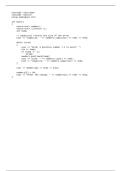
This file is a C++ program that demonstrates the use of the standard library's `vector` container. Here’s a breakdown of what it does: 1. **Includes Necessary Libraries**: It begins by including the `iostream` and `vector` libraries, which are essential for input/output operations and the use of dynamic arrays, respectively. 2. **Using Namespace**: The `using namespace std;` line allows the program to use standard library names without needing to prefix them with `std::`. 3. **Main Function**: The program starts execution in the `main()` function. 4. **Vector Declaration**: It declares a vector of integers named `numbers` and an iterator `it` for traversing the vector. 5. **User Input Loop**: The program enters an infinite loop where it prompts the user to enter positive integers. The loop continues until the user inputs `-1`, which serves as a signal to exit. 6. **Dynamic Size Management**: After each valid number is input, the program uses `push_back()` to add the number to the `numbers` vector. It then outputs the current size and capacity of the vector. The `capacity()` function returns the size of the allocated storage used for the vector, which may be greater than or equal to its current size. 7. **Accessing Vector Element**: After the loop, the program accesses and prints the third element (index 2) of the vector. 8. **Modifying Vector Element**: The program then modifies the third element of the vector (index 2) to a value of `99` and outputs the changed value. Overall, this program demonstrates basic C++ programming concepts, including loops, user input handling, the dynamic array capabilities of `vector`, and element accessing/modification. It's a good example for beginners to understand how vectors work in C++.

Vista previa del contenido

#include <iostream>
#include <vector>
using namespace std;

int main()
{
vector<int> numbers;
vector<int>::iterator it;
int temp;

// capacity() returns the size of the array
cout << "Capacity: " << numbers.capacity() << endl << endl;

while (true)
{
cout << "Enter a positive number (-1 to quit): ";
cin >> temp;
if (temp == -1)
break;
numbers.push_back(temp);
cout << "Size: " << numbers.size() << endl;
cout << "Capacity: " << numbers.capacity() << endl;
}

cout << numbers[2] << endl << endl;

numbers[2] = 99;
cout << "After the change, " << numbers[2] << endl << endl;
}

Libro relacionado
 image
Editorial: 2017 ISBN: 9780134498379 Edición: Desconocido

Información del documento

Subido en
6 de noviembre de 2025
Número de páginas
1
Escrito en
2025/2026
Tipo
Otro
Personaje
Desconocido
$15.99

¿Documento equivocado? Cámbialo gratis Dentro de los 14 días posteriores a la compra y antes de descargarlo, puedes elegir otro documento. Puedes gastar el importe de nuevo.
Escrito por estudiantes que aprobaron
Inmediatamente disponible después del pago
Leer en línea o como PDF

Vendido
0
Seguidores
0
Artículos
68
Última venta
-


Por qué los estudiantes eligen Stuvia

Creado por compañeros estudiantes, verificado por reseñas

Calidad en la que puedes confiar: escrito por estudiantes que aprobaron y evaluado por otros que han usado estos resúmenes.

¿No estás satisfecho? Elige otro documento

¡No te preocupes! Puedes elegir directamente otro documento que se ajuste mejor a lo que buscas.

Paga como quieras, empieza a estudiar al instante

Sin suscripción, sin compromisos. Paga como estés acostumbrado con tarjeta de crédito y descarga tu documento PDF inmediatamente.

Student with book image

“Comprado, descargado y aprobado. Así de fácil puede ser.”

Alisha Student

Preguntas frecuentes
