100% de satisfacción garantizada Inmediatamente disponible después del pago Tanto en línea como en PDF No estas atado a nada 4.2 TrustPilot
logo-home
Examen

CVENT CERTIFICATION EXAM QUESTIONS AND ANSWERS

Puntuación
-
Vendido
-
Páginas
4
Grado
A+
Subido en
22-06-2025
Escrito en
2024/2025

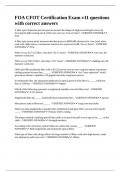
CVENT CERTIFICATION EXAM QUESTIONS AND ANSWERS 1) Public 2) Private 3) Invite-Only - Answer-1) Open to all 2) Open to invitation lists 3) Specific invitation lists, very exclusive Event Capacity - Answer-Once the event reaches a certain capacity (set by the administrator) the event will close automatically Registration Deadline - Answer-The last date that an individual can register on. The event will automatically close after this date. Status Types - Answer-Pending, test mode, active, cancelled, closed, completed, archived Pending - Answer--You completed the Event Creation Wizard. -Testing can only be done in preview mode. -All items and fees can be added, edited, or removed. Pending (Test-Mode) - Answer--You clicked "Move to Test Mode" on the Overview page. -You can test registration in its entirety. -All items and fees can be added, edited, or removed. -Online payments cannot be processed. Active - Answer--You clicked "Launch Event" on the Overview page. -The website opens. -Registration items can no longer be deleted, only deactivated. -This is the only point where invitees can register on their own. Closed - Answer--Registration has reached capacity or the deadline has passed. -The website remains open. -Registration is closed, but registrants can still access their information and pay online. -You can modify registrations, issue refunds, or register latecomers on the back end. Completed - Answer--The end date has passed. -The website remains open. -Registration is closed, but registrants can still access their information and pay online. -You can modify registrations, issue refunds, or register latecomers on the back end. Archived - Answer--The archive date has passed. -The website is closed. -Registrants will no longer be able to view their information, pay online, or give feedback. -You can still modify registrations, issue refunds, or register latecomers on the back end. Test Actions (Email) - Answer-Specify the contact type, invitation list, and email. Test Actions (Website) - Answer-If you're arriving at your event website through an email, determine your contact type, invitation list, and starting page. If you're arriving through a generic weblink, simply select a starting page. Test Actions (Registration Process) - Answer-If you're arriving to registration through an email, determine your contact type and invitation list. If you're arriving to registration from a path-specific weblink, simply select the registration path. When you initiate the test, registration opens in a new window. Registration Type - Answer-Registration types determine what groups of people see during registration, what they can select, and how much those items cost. Registrants can only have one registration type per event, but they can use a different one for a different event. After all, today's speaker could be tomorrow's attendee. Admission Item - Answer-Is your ticket to the event. What pass for the event - VIP Pass, Standard Pass - or 1-day pass. Will only see the sessions association with the admission item selected. Session - Answer-A presentation, discussion, or activity you've added that invitees can register for or that's included automatically with registration. Optional Item - Answer-Raffle tickets, T-shirts, and memberships are examples of optional items, which are anything that can be purchased or added during registration and in one of these four categories: quantity items, membership items, group items, and donation items. Session Groups - Answer-A way to organize multiple optional sessions. Since an invitee can only select one session from a session group, they can be used to prevent scheduling conflicts, limit an invitee's selection, or simply shorten the registration process. Session Category - Answer-Designed to organize your agenda based on topics, session categories lump related sessions together so that invitees can more easily find the ones that interest them while registering. Included Session - Answer-what's already on the agenda for the event and it's set up for the attendee - No additional fees or additional capacity Optional Session - Answer-list of sessions the attendee can go and select them to add to their agenda. Can have a capacity and can have additional costs on each session. Track - Answer-These are bundles of sessions. Designed to streamline registrat

Mostrar más Leer menos
Institución
CVENT CERTIFICATION
Grado
CVENT CERTIFICATION


Ups! No podemos cargar tu documento ahora. Inténtalo de nuevo o contacta con soporte.

Escuela, estudio y materia

Institución
CVENT CERTIFICATION
Grado
CVENT CERTIFICATION

Información del documento

Subido en
22 de junio de 2025
Número de páginas
4
Escrito en
2024/2025
Tipo
Examen
Contiene
Preguntas y respuestas

Temas

Vista previa del contenido

CVENT CERTIFICATION EXAM
QUESTIONS AND ANSWERS
1) Public
2) Private
3) Invite-Only - Answer-1) Open to all
2) Open to invitation lists
3) Specific invitation lists, very exclusive

Event Capacity - Answer-Once the event reaches a certain capacity (set by the
administrator) the event will close automatically

Registration Deadline - Answer-The last date that an individual can register on. The
event will automatically close after this date.

Status Types - Answer-Pending, test mode, active, cancelled, closed, completed,
archived

Pending - Answer--You completed the Event Creation Wizard.
-Testing can only be done in preview mode.
-All items and fees can be added, edited, or removed.

Pending (Test-Mode) - Answer--You clicked "Move to Test Mode" on the Overview
page.
-You can test registration in its entirety.
-All items and fees can be added, edited, or removed.
-Online payments cannot be processed.

Active - Answer--You clicked "Launch Event" on the Overview page.
-The website opens.
-Registration items can no longer be deleted, only deactivated.
-This is the only point where invitees can register on their own.

Closed - Answer--Registration has reached capacity or the deadline has passed.
-The website remains open.
-Registration is closed, but registrants can still access their information and pay
online.
-You can modify registrations, issue refunds, or register latecomers on the back end.

Completed - Answer--The end date has passed.
-The website remains open.
-Registration is closed, but registrants can still access their information and pay
online.
-You can modify registrations, issue refunds, or register latecomers on the back end.

Archived - Answer--The archive date has passed.
-The website is closed.
$15.49
Accede al documento completo:

100% de satisfacción garantizada
Inmediatamente disponible después del pago
Tanto en línea como en PDF
No estas atado a nada

Conoce al vendedor

Seller avatar
Los indicadores de reputación están sujetos a la cantidad de artículos vendidos por una tarifa y las reseñas que ha recibido por esos documentos. Hay tres niveles: Bronce, Plata y Oro. Cuanto mayor reputación, más podrás confiar en la calidad del trabajo del vendedor.
Freshy Oxford University
Seguir Necesitas iniciar sesión para seguir a otros usuarios o asignaturas
Vendido
51
Miembro desde
1 año
Número de seguidores
4
Documentos
6784
Última venta
2 días hace

3.6

10 reseñas

5
3
4
4
3
1
2
0
1
2

Recientemente visto por ti

Por qué los estudiantes eligen Stuvia

Creado por compañeros estudiantes, verificado por reseñas

Calidad en la que puedes confiar: escrito por estudiantes que aprobaron y evaluado por otros que han usado estos resúmenes.

¿No estás satisfecho? Elige otro documento

¡No te preocupes! Puedes elegir directamente otro documento que se ajuste mejor a lo que buscas.

Paga como quieras, empieza a estudiar al instante

Sin suscripción, sin compromisos. Paga como estés acostumbrado con tarjeta de crédito y descarga tu documento PDF inmediatamente.

Student with book image

“Comprado, descargado y aprobado. Así de fácil puede ser.”

Alisha Student

Preguntas frecuentes