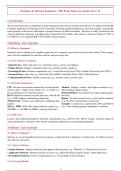
Hardware & Software Explained – IEB Study Notes for Grades 10 to 12
1 Introduction
This document provides a comprehensive guide to hardware and software concepts for Grades 10–12, aligned with the IEB
Computer Applications Technology (CAT) curriculum. It includes detailed explanations, practical examples, and example
exam questions with answers and helpers to prepare learners for IEB assessments. The focus is solely on hardware and
software definitions, functions, and applications, tailored for CAT students. All content is verified as of May 27, 2025, at
2:30 PM EAT. Use alongside IEB CAT textbooks and past papers.
2 Hardware: Core Concepts
2.1 What is Hardware?
Hardware refers to the physical, tangible components of a computer system that can be seen and touched. These compo-
nents form the foundation for executing software and processing data.
2.1.1 Key Hardware Categories
• Input Devices: Allow data entry (e.g., keyboard, mouse, scanner, microphone).
• Output Devices: Display or produce results (e.g., monitor, printer, speakers).
• Processing Devices: Perform computations (e.g., Central Processing Unit (CPU), Graphics Processing Unit (GPU)).
• Storage Devices: Store data (e.g., Hard Disk Drive (HDD), Solid-State Drive (SSD), USB flash drive).
• Communication Devices: Enable connectivity (e.g., modem, router, network card).
2.1.2 Detailed Explanations
CPU: The processor executes instructions via fetch-decode- Monitor: Displays visuals, with higher resolutions (e.g.,
execute cycles. Higher clock speeds (e.g., 4.2 GHz) im- 4K) providing sharper images.
prove performance for tasks like gaming. Keyboard/Mouse: Essential for user input, enhancing pro-
RAM: Temporary memory for active processes. More RAM ductivity.
(e.g., 16GB) supports multitasking without lag. Router: Provides network access, with modern standards
Motherboard: Connects all components, facilitating data (e.g., Wi-Fi 6) ensuring faster connections.
transfer. Example: A student uses a laptop with a CPU and RAM to
SSD vs. HDD: SSDs offer faster read/write speeds (e.g., run a video editing program, outputting to a monitor.
500 MB/s vs. 100 MB/s for HDDs), reducing load times.
2.1.3 IEB Focus
Learners must understand hardware functions, specifications (e.g., GHz for CPU, GB for storage), and their impact on
system performance. Questions often involve comparing components or recommending upgrades.
3 Software: Core Concepts
3.1 What is Software?
Software is a set of intangible instructions, programs, or data that directs hardware to perform tasks. It enables function-
ality and user interaction.
3.1.1 Types of Software
• System Software: Manages hardware and supports other programs (e.g., Windows 11, Ubuntu, device drivers).
• Application Software: Performs specific user tasks (e.g., Microsoft Word, Google Chrome, Adobe Illustrator).
• Development Software: Tools for programming (e.g., Visual Studio Code, PyCharm).
3.1.2 Licensing Models
1
, Proprietary: Paid, restricted code (e.g., Microsoft Office). Example: A student uses open-source GIMP for image edit-
Open-Source: Free, modifiable code (e.g., LibreOffice). ing to avoid the cost of proprietary Photoshop.
Freeware: Free, closed-source (e.g., VLC Media Player). IEB Focus: Learners must differentiate software types and
Shareware: Trial-based, paid for full features (e.g., Win- licensing, evaluating suitability for tasks like document cre-
RAR). ation or web browsing.
3.1.3 Applications
• Operating Systems: Control hardware and run apps (e.g., macOS Sonoma).
• Productivity Software: Support tasks (e.g., Excel for data analysis).
• Creative Software: Enable design (e.g., Adobe Premiere for video editing).
• Browsers: Facilitate internet access (e.g., Firefox).
4 Hardware and Software Integration
4.1 Interdependence
Hardware and software are interdependent: hardware executes software instructions, and software requires hardware to
function. For example, a CPU processes an operating system to run a spreadsheet program.
4.2 Practical Example
A graphic designer uses a computer with a powerful GPU (hardware) to run Adobe Photoshop (software). The GPU
accelerates rendering, while Photoshop provides editing tools, enabling efficient design work.
4.3 IEB Application
Learners analyze how hardware specifications (e.g., RAM size, CPU speed) affect software performance (e.g., lag in
gaming) and propose solutions for specific scenarios, such as upgrading a slow computer.
5 Key Differences and Comparisons
5.1 Comparison Table
Aspect Hardware Software
Nature Physical, tangible components Intangible instructions or pro-
grams
Examples CPU, monitor, SSD Windows, Excel, GIMP
Function Executes physical tasks Directs hardware to perform
tasks
Upgrades Replace or add components Update or install new versions
(e.g., more RAM)
Cost Often expensive (e.g., new GPU) Varies (free open-source to paid
proprietary)
5.2 IEB Focus
Questions may require comparing hardware and software roles or selecting appropriate combinations for tasks (e.g., high-
end hardware for video editing software).
6 Example Exam Questions and Answers
6.1 Question Set 1: Hardware
6.1.1 Question 1.1 (4 marks) 6.1.1 Question 1.3 (5 marks)
Define hardware and list three examples of output devices. A computer lab experiences slow application loading. Rec-
Answer: Hardware is the physical, tangible components of ommend a hardware upgrade and justify its benefits.
2
1 Introduction
This document provides a comprehensive guide to hardware and software concepts for Grades 10–12, aligned with the IEB
Computer Applications Technology (CAT) curriculum. It includes detailed explanations, practical examples, and example
exam questions with answers and helpers to prepare learners for IEB assessments. The focus is solely on hardware and
software definitions, functions, and applications, tailored for CAT students. All content is verified as of May 27, 2025, at
2:30 PM EAT. Use alongside IEB CAT textbooks and past papers.
2 Hardware: Core Concepts
2.1 What is Hardware?
Hardware refers to the physical, tangible components of a computer system that can be seen and touched. These compo-
nents form the foundation for executing software and processing data.
2.1.1 Key Hardware Categories
• Input Devices: Allow data entry (e.g., keyboard, mouse, scanner, microphone).
• Output Devices: Display or produce results (e.g., monitor, printer, speakers).
• Processing Devices: Perform computations (e.g., Central Processing Unit (CPU), Graphics Processing Unit (GPU)).
• Storage Devices: Store data (e.g., Hard Disk Drive (HDD), Solid-State Drive (SSD), USB flash drive).
• Communication Devices: Enable connectivity (e.g., modem, router, network card).
2.1.2 Detailed Explanations
CPU: The processor executes instructions via fetch-decode- Monitor: Displays visuals, with higher resolutions (e.g.,
execute cycles. Higher clock speeds (e.g., 4.2 GHz) im- 4K) providing sharper images.
prove performance for tasks like gaming. Keyboard/Mouse: Essential for user input, enhancing pro-
RAM: Temporary memory for active processes. More RAM ductivity.
(e.g., 16GB) supports multitasking without lag. Router: Provides network access, with modern standards
Motherboard: Connects all components, facilitating data (e.g., Wi-Fi 6) ensuring faster connections.
transfer. Example: A student uses a laptop with a CPU and RAM to
SSD vs. HDD: SSDs offer faster read/write speeds (e.g., run a video editing program, outputting to a monitor.
500 MB/s vs. 100 MB/s for HDDs), reducing load times.
2.1.3 IEB Focus
Learners must understand hardware functions, specifications (e.g., GHz for CPU, GB for storage), and their impact on
system performance. Questions often involve comparing components or recommending upgrades.
3 Software: Core Concepts
3.1 What is Software?
Software is a set of intangible instructions, programs, or data that directs hardware to perform tasks. It enables function-
ality and user interaction.
3.1.1 Types of Software
• System Software: Manages hardware and supports other programs (e.g., Windows 11, Ubuntu, device drivers).
• Application Software: Performs specific user tasks (e.g., Microsoft Word, Google Chrome, Adobe Illustrator).
• Development Software: Tools for programming (e.g., Visual Studio Code, PyCharm).
3.1.2 Licensing Models
1
, Proprietary: Paid, restricted code (e.g., Microsoft Office). Example: A student uses open-source GIMP for image edit-
Open-Source: Free, modifiable code (e.g., LibreOffice). ing to avoid the cost of proprietary Photoshop.
Freeware: Free, closed-source (e.g., VLC Media Player). IEB Focus: Learners must differentiate software types and
Shareware: Trial-based, paid for full features (e.g., Win- licensing, evaluating suitability for tasks like document cre-
RAR). ation or web browsing.
3.1.3 Applications
• Operating Systems: Control hardware and run apps (e.g., macOS Sonoma).
• Productivity Software: Support tasks (e.g., Excel for data analysis).
• Creative Software: Enable design (e.g., Adobe Premiere for video editing).
• Browsers: Facilitate internet access (e.g., Firefox).
4 Hardware and Software Integration
4.1 Interdependence
Hardware and software are interdependent: hardware executes software instructions, and software requires hardware to
function. For example, a CPU processes an operating system to run a spreadsheet program.
4.2 Practical Example
A graphic designer uses a computer with a powerful GPU (hardware) to run Adobe Photoshop (software). The GPU
accelerates rendering, while Photoshop provides editing tools, enabling efficient design work.
4.3 IEB Application
Learners analyze how hardware specifications (e.g., RAM size, CPU speed) affect software performance (e.g., lag in
gaming) and propose solutions for specific scenarios, such as upgrading a slow computer.
5 Key Differences and Comparisons
5.1 Comparison Table
Aspect Hardware Software
Nature Physical, tangible components Intangible instructions or pro-
grams
Examples CPU, monitor, SSD Windows, Excel, GIMP
Function Executes physical tasks Directs hardware to perform
tasks
Upgrades Replace or add components Update or install new versions
(e.g., more RAM)
Cost Often expensive (e.g., new GPU) Varies (free open-source to paid
proprietary)
5.2 IEB Focus
Questions may require comparing hardware and software roles or selecting appropriate combinations for tasks (e.g., high-
end hardware for video editing software).
6 Example Exam Questions and Answers
6.1 Question Set 1: Hardware
6.1.1 Question 1.1 (4 marks) 6.1.1 Question 1.3 (5 marks)
Define hardware and list three examples of output devices. A computer lab experiences slow application loading. Rec-
Answer: Hardware is the physical, tangible components of ommend a hardware upgrade and justify its benefits.
2