100% de satisfacción garantizada Inmediatamente disponible después del pago Tanto en línea como en PDF No estas atado a nada 4,6 TrustPilot
logo-home
Examen

Probability and Statistics in Microsoft Excel Exam Questions with Verified Solutions (Graded A+)

Puntuación
-
Vendido
-
Páginas
4
Grado
A+
Subido en
15-11-2024
Escrito en
2024/2025

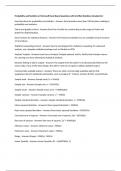
Probability and Statistics in Microsoft Excel Exam Questions with Verified Solutions (Graded A+) Excel functions for probability and statistics - Answers Excel provides more than 100 functions relating to probability and statistics. Charts and graphs in Excel - Answers Excel has a facility for constructing a wide range of charts and graphs for displaying data. Excel versions for statistical features - Answers The features included here are available in Excel Versions 4.0 and above. Statistical computing in Excel - Answers Excel is not designed for statistical computing; for advanced analysis, use a bespoke statistical package such as Minitab or SPSS. Analysis Toolpak - Answers Excel has an Analysis Toolpak optional 'add-in' facility that includes macros for carrying out many elementary statistical analyses. Dynamic linking of add-in output - Answers The output from the add-in is not dynamically linked to the source data; if any of the data change, the add-in must be run again to obtain updated output. Commercially available add-ins - Answers There are other commercially available add-ins that supplement Excel's statistical functionality, such as Analyse-it®, R-Excel, Unistat, XLSTAT, and StatTools. Sample total - Answers Sample total, Σx = SUM(x) Sample size - Answers Sample size, n = COUNT(x) Sample mean - Answers Sample mean, Σx/n = AVERAGE(x) Sample variance - Answers Sample variance, s² = VAR(x) Sample standard deviation - Answers Sample standard deviation, s = STDEV(x) Mean squared deviation - Answers Mean squared deviation = VARP(x) Root mean squared deviation - Answers Root mean squared deviation = STDEVP(x) Corrected sum of squares - Answers Corrected sum of squares, Sxx = DEVSQ(x) Raw sum of squares - Answers Raw sum of squares, Σx² = SUMSQ(x) Minimum value - Answers Minimum value = MIN(x) Maximum value - Answers Maximum value = MAX(x) Range - Answers Range = MAX(x) - MIN(x) Lower Quartile - Answers Lower Quartile, Q1 = QUARTILE(x, 1) Median - Answers Median, Q2 = MEDIAN(x) Upper Quartile - Answers Upper Quartile, Q3 = QUARTILE(x, 3) Interquartile range - Answers Interquartile range, IQR = QUARTILE(x, 3) - QUARTILE(x, 1) Kth Percentile - Answers Kth Percentile = PERCENTILE(x, K%) where K is a number between 0 and 100 Mode - Answers Mode = MODE(x) Grouped Frequency Data - Answers Assuming a frequency distribution with class midpoints stored in range x and frequencies in range f. Sample total for frequency data - Answers Sample total, Σfx = SUMPRODUCT(f, x) Sample mean for frequency data - Answers Sample mean, Σfx/n = SUMPRODUCT(f, x)/SUM(f) Graphical representations in Excel - Answers Excel offers a wide range of chart types for displaying data. Number of different combinations of m objects selected from n objects - Answers nCm = COMBIN(n, m) Number of different permutations of m objects selected from n objects - Answers nPm = PERMUT(n, m) Binomial Distribution - Answers Bin(n, p) P(X=a) for Binomial - Answers P(X=a) = BINOMDIST(a, n, p, FALSE) P(X≤a) for Binomial - Answers P(X≤a) = BINOMDIST(a, n, p, TRUE) Geometric Distribution - Answers Geom(p) P(X=a) for Geometric - Answers P(X=a) = BINOMDIST(1, a, p, FALSE)/a P(X≤a) for Geometric - Answers P(X≤a) = 1 - BINOMDIST(0, a, p, FALSE) Poisson Distribution - Answers Po(λ) P(X=a) for Poisson - Answers P(X=a) = POISSON(a, lambda, FALSE) P(X≤a) for Poisson - Answers P(X≤a) = POISSON(a, lambda, TRUE) Pascal Distribution - Answers Pasc(n, p) P(X=a) for Pascal - Answers P(X=a) = NEGBINOMDIST(a - n, n, p) P(X≤a) for Pascal - Answers P(X≤a) = BETADIST(p, n, a - n + 1)/BETADIST(1, n, a - n + 1) Normal Distribution - Answers N(µ, σ2)

Mostrar más Leer menos
Institución
Probability And Statistics In Microsoft Excel
Grado
Probability and Statistics in Microsoft Excel


Ups! No podemos cargar tu documento ahora. Inténtalo de nuevo o contacta con soporte.

Escuela, estudio y materia

Institución
Probability and Statistics in Microsoft Excel
Grado
Probability and Statistics in Microsoft Excel

Información del documento

Subido en
15 de noviembre de 2024
Número de páginas
4
Escrito en
2024/2025
Tipo
Examen
Contiene
Preguntas y respuestas

Temas

Vista previa del contenido

Probability and Statistics in Microsoft Excel Exam Questions with Verified Solutions (Graded A+)

Excel functions for probability and statistics - Answers Excel provides more than 100 functions relating to
probability and statistics.

Charts and graphs in Excel - Answers Excel has a facility for constructing a wide range of charts and
graphs for displaying data.

Excel versions for statistical features - Answers The features included here are available in Excel Versions
4.0 and above.

Statistical computing in Excel - Answers Excel is not designed for statistical computing; for advanced
analysis, use a bespoke statistical package such as Minitab or SPSS.

Analysis Toolpak - Answers Excel has an Analysis Toolpak optional 'add-in' facility that includes macros
for carrying out many elementary statistical analyses.

Dynamic linking of add-in output - Answers The output from the add-in is not dynamically linked to the
source data; if any of the data change, the add-in must be run again to obtain updated output.

Commercially available add-ins - Answers There are other commercially available add-ins that
supplement Excel's statistical functionality, such as Analyse-it®, R-Excel, Unistat, XLSTAT, and StatTools.

Sample total - Answers Sample total, Σx = SUM(x)

Sample size - Answers Sample size, n = COUNT(x)

Sample mean - Answers Sample mean, Σx/n = AVERAGE(x)

Sample variance - Answers Sample variance, s² = VAR(x)

Sample standard deviation - Answers Sample standard deviation, s = STDEV(x)

Mean squared deviation - Answers Mean squared deviation = VARP(x)

Root mean squared deviation - Answers Root mean squared deviation = STDEVP(x)

Corrected sum of squares - Answers Corrected sum of squares, Sxx = DEVSQ(x)

Raw sum of squares - Answers Raw sum of squares, Σx² = SUMSQ(x)

Minimum value - Answers Minimum value = MIN(x)

Maximum value - Answers Maximum value = MAX(x)

Range - Answers Range = MAX(x) - MIN(x)

Lower Quartile - Answers Lower Quartile, Q1 = QUARTILE(x, 1)
$8.49
Accede al documento completo:

100% de satisfacción garantizada
Inmediatamente disponible después del pago
Tanto en línea como en PDF
No estas atado a nada


Documento también disponible en un lote

Conoce al vendedor

Seller avatar
Los indicadores de reputación están sujetos a la cantidad de artículos vendidos por una tarifa y las reseñas que ha recibido por esos documentos. Hay tres niveles: Bronce, Plata y Oro. Cuanto mayor reputación, más podrás confiar en la calidad del trabajo del vendedor.
TutorJosh Chamberlain College Of Nursing
Seguir Necesitas iniciar sesión para seguir a otros usuarios o asignaturas
Vendido
361
Miembro desde
1 año
Número de seguidores
16
Documentos
29479
Última venta
6 días hace
Tutor Joshua

Here You will find all Documents and Package Deals Offered By Tutor Joshua.

3.6

58 reseñas

5
20
4
15
3
12
2
0
1
11

Recientemente visto por ti

Por qué los estudiantes eligen Stuvia

Creado por compañeros estudiantes, verificado por reseñas

Calidad en la que puedes confiar: escrito por estudiantes que aprobaron y evaluado por otros que han usado estos resúmenes.

¿No estás satisfecho? Elige otro documento

¡No te preocupes! Puedes elegir directamente otro documento que se ajuste mejor a lo que buscas.

Paga como quieras, empieza a estudiar al instante

Sin suscripción, sin compromisos. Paga como estés acostumbrado con tarjeta de crédito y descarga tu documento PDF inmediatamente.

Student with book image

“Comprado, descargado y aprobado. Así de fácil puede ser.”

Alisha Student

Preguntas frecuentes