

Instructions
1. Make a copy of this template and call it the exercise or the exam you are working on.
2. Fill in the values in cells with no colour. The coloured cells have formulas or links
3. The formula cells are not protected - you can override them.
4. Practice exercises with the template to become familiar with how it works.
5. During the assignment, save a copy of your workings for each of the questions. There are normally 2 long qu
6. You can add in your own calculations and workings as needed
7. You still need to know and understand the work. This helps you get the calculations done quickly and accura
the layouts.
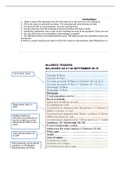
8. Below is a guide showing you where to fill in the values on the template. After filling these in, you need to ap
Put in SoCie sheet
Depreciation table in
SoFP
Existing Credit Loss
Allowance in the Break out
box for Credit Loss on the
Statement of Profit or Loss
sheet
Cash and Equivalents (4)
in SoFP
These expenses can be placed
anywhere in Distribution,
Administrative and Other
Expenses (Debit Balances) on
the Statement of Profit or
Loss. Be careful not to
overwrite the 2 formula
fields : Depreciation and
Credit Losses
1. Make a copy of this template and call it the exercise or the exam you are working on.
2. Fill in the values in cells with no colour. The coloured cells have formulas or links
3. The formula cells are not protected - you can override them.
4. Practice exercises with the template to become familiar with how it works.
5. During the assignment, save a copy of your workings for each of the questions. There are normally 2 long qu
6. You can add in your own calculations and workings as needed
7. You still need to know and understand the work. This helps you get the calculations done quickly and accura
the layouts.
8. Below is a guide showing you where to fill in the values on the template. After filling these in, you need to ap
Put in SoCie sheet
Depreciation table in
SoFP
Existing Credit Loss
Allowance in the Break out
box for Credit Loss on the
Statement of Profit or Loss
sheet
Cash and Equivalents (4)
in SoFP
These expenses can be placed
anywhere in Distribution,
Administrative and Other
Expenses (Debit Balances) on
the Statement of Profit or
Loss. Be careful not to
overwrite the 2 formula
fields : Depreciation and
Credit Losses


