
A short ispLever Tutorial
Follow the following steps closely and make sure you understand the process.
Open ISPLever
File >> New Project
Type: “ass1” or any name of your choice
NEVER PUT SPACES OR OTHER CHARACTERS IN FILENAMES!!!!!
Change Project Type to Schematic/ABEL
Save in: Locate your memory stick and folder
Click OK
Right click on the Chip Symbol >> Select New Device
Change the following:
Family: GAL Device (Scroll up)
Device: GAL16V8D
Part name: GAL16V8D-25LP (Scroll)
Click OK
Right click on the Chip Symbol >> Click on New
Choose Schematic >> Click OK
Type: “ass1” or any name of your choice
Transfer your design to the schematic
Save your schematic
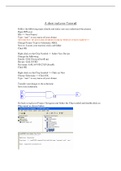
Go back to ispLever Project Navigator and Select the Chip symbol and double click on
Chip report as shown below
, To simulate your design you need to create waveform
Right click on the Chip Symbol >> Click on New
Choose Waveform Stimulus >> Click OK
Choose ass1 >> Click OK
Type: “ass1” or any name of your choice
Go to Edit >> Import wave
Click on Add All
Click on Show
Click on Cancel
Follow the following steps closely and make sure you understand the process.
Open ISPLever
File >> New Project
Type: “ass1” or any name of your choice
NEVER PUT SPACES OR OTHER CHARACTERS IN FILENAMES!!!!!
Change Project Type to Schematic/ABEL
Save in: Locate your memory stick and folder
Click OK
Right click on the Chip Symbol >> Select New Device
Change the following:
Family: GAL Device (Scroll up)
Device: GAL16V8D
Part name: GAL16V8D-25LP (Scroll)
Click OK
Right click on the Chip Symbol >> Click on New
Choose Schematic >> Click OK
Type: “ass1” or any name of your choice
Transfer your design to the schematic
Save your schematic
Go back to ispLever Project Navigator and Select the Chip symbol and double click on
Chip report as shown below
, To simulate your design you need to create waveform
Right click on the Chip Symbol >> Click on New
Choose Waveform Stimulus >> Click OK
Choose ass1 >> Click OK
Type: “ass1” or any name of your choice
Go to Edit >> Import wave
Click on Add All
Click on Show
Click on Cancel


