
Written by students who passed Immediately available after payment Read online or as PDF Wrong document? Swap it for free 4,6 TrustPilot
logo-home
Exam (elaborations)

Accounting Information Systems in a Computer Environment

Rating
-
Sold
-
Pages
23
Grade
A+
Uploaded on
14-05-2026
Written in
2025/2026

This document provides detailed notes and academic content on Accounting Information Systems in a Computer Environment for AIN1501. It explains the role of accounting information systems within modern organisations and examines how computer technology supports financial reporting, transaction processing, data management, and decision making. Topics covered include system components, internal controls, electronic data processing, accounting software, information security, database systems, and the impact of digital transformation on accounting practices. The document is designed to assist students with assignments, tests, examinations, and overall understanding of accounting information systems within a computerised business environment. The content is written in a structured and academically appropriate format, making it useful for revision and independent study.

Show more Read less

Content preview

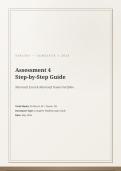
AIN1501 — SEMESTER 1 2026


Assessment 4
Step-by-Step Guide
Microsoft Excel & Microsoft Teams Portfolio


Total Marks: 50 (Excel: 40 | Teams: 10)
Document Type: Complete Walkthrough Guide
Date: May 2026

,Table of Contents


1. Assessment Overview & Preparation

1.1 Files to Download

1.2 Naming Conventions

1.3 Submission Checklist

2. Question 1: Microsoft Excel (40 Marks)

2.1 Save Your File (Critical)

2.2 Rename the Worksheet

2.3 Merge and Center Cells G1:N1

2.4 Set Column B Width

2.5 Add Your Details in Cell B2

2.6 Text Wrap Cell O1

2.7 Hide Column F

2.8 Calculate Magazine Shop Pay (D6)

2.9 Total Expenses Function (N6)

2.10 Insert Comment in E3

2.11 Count Months Function (E15)

2.12 Add Average Income Label (A16)

2.13 Correct Error in E16

2.14 Lowest Income Function (E17)

2.15 Total Savings Formula (E18)

2.16 Calculate Bonus (E19)

2.17 Save Final Document

3. Question 2: Microsoft Teams (10 Marks)

3.1 Create a Future Meeting

3.2 Start an Instant Meeting

3.3 Raise Your Hand

, 3.4 Share Your Excel Screen

3.5 Save as PDF

4. Formula Quick Reference

5. Troubleshooting Tips
Document information

Uploaded on
May 14, 2026
Number of pages
23
Written in
2025/2026
Type
Exam (elaborations)
Contains
Questions & answers
R100,00
Get access to the full document:

Wrong document? Swap it for free Within 14 days of purchase and before downloading, you can choose a different document. You can simply spend the amount again.
Written by students who passed
Immediately available after payment
Read online or as PDF

Get to know the seller
Seller avatar
adriantungamiraimasakambl

Get to know the seller

Seller avatar
adriantungamiraimasakambl Teachme2-tutor
View profile
Follow You need to be logged in order to follow users or courses
Sold
1
Member since
1 year
Number of followers
0
Documents
6
Last sold
1 month ago
ELITE TUTORIALS

Elite Tutorials offers specialized assignment and exam assistance for UNISA students, ensuring personalized support and expert guidance in various subjects. Our experienced tutors are dedicated to helping you achieve academic excellence and success in your studies. Contact us today at or to boost your grades and gain confidence in your academic journey.

0,0

0 reviews

5
0
4
0
3
0
2
0
1
0

Recently viewed by you

Why students choose Stuvia

Created by fellow students, verified by reviews

Quality you can trust: written by students who passed their exams and reviewed by others who've used these notes.

Didn't get what you expected? Choose another document

No worries! You can immediately select a different document that better matches what you need.

Pay how you prefer, start learning right away

No subscription, no commitments. Pay the way you're used to via credit card or EFT and download your PDF document instantly.

Student with book image

“Bought, downloaded, and aced it. It really can be that simple.”

Alisha Student

Working on your references?

Create accurate citations in APA, MLA and Harvard with our free citation generator.

Working on your references?

Frequently asked questions

