
1. Introduction
1.1 what you will learn
Goal: give a solid foundation in the most important tools.
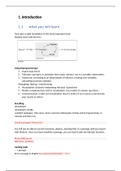
Needed tools look like this:
Using R(programming) :
1. import data into R.
2. Tidy data: storing in a consistent form (each column/ row is a variable/ observation.
3. Transform: narrowing in on observations of interest, creating new variables,
calculating summary statistics.
Wrangling= tidying + transforming
4. Visualization: (human) interpreting the data (questions)
5. Model: complementary tool to visualization. Use models to answer questions.
6. Communication: model and visualization doesn’t matter if you cannot communicate
your results to others.
Installing:
-download r
-download r studio
-install R packages: tidy verse: share common philosophy of data and R programming. In
console and then run.
install.packages("tidyverse")
You will not be able to use the functions, objects, and help files in a package until you load it
with library(). Once you have installed a package, you can load it with the library() function:
library(tidyverse)
tidyverse_update()
running code
> = prompt
Error message in English Sys.setenv(LANGUAGE = "en")
,Help
- Google
- Stackoverflow
- Prepare a minimal reproducible example/ reprex
1. Packages loaded at top of the script - tidyverse_update()
2. Include data(set) in a question dput(mtcars) (run this, copy output in my
reproducible script mtcars <- paste
3. Code is easy to read to others
2. Introduction: data exploration
Data exploration is the art of looking at your data, rapidly generating hypotheses, quickly
testing them, then repeating again and again and again.
Visualization: make elegant and informative plots that help you understand data.
Data transformation: learn key verbs that allow to select important variables, filter key
observations, create new variables and compute summaries.
exploratory data analysis, you’ll combine visualisation and transformation with your
curiosity and scepticism to ask and answer interesting questions about data.
Modelling (later explained)
4. workflow: basics
Create new objects/ variables assignment statement: x < - …….
<- = ALT +-
Inspect an object by typing name # = inspection results
Sequences seq
+ = r is waiting for more input
, 6.Workflow: scripts
1. Running code
The key to using the script editor effectively is to memorise one of the most important
keyboard shortcuts: Cmd/Ctrl + Enter. This executes the current R expression in the console.
For example, take the code below. If your cursor is at █, pressing Cmd/Ctrl + Enter will run
the complete command that generates not_cancelled. It will also move the cursor to the
next statement (beginning with not_cancelled %>%). That makes it easy to run your
complete script by repeatedly pressing Cmd/Ctrl + Enter.
library(dplyr)
library(nycflights13)
not_cancelled <- flights %>%
filter(!is.na(dep_delay)█, !is.na(arr_delay))
not_cancelled %>%
group_by(year, month, day) %>%
summarise(mean = mean(dep_delay))
running the full expression: Ctrl + Shift + S.
I recommend that you always start your script with the packages that you need. That way, if
you share your code with others, they can easily see what packages they need to install.
Note, however, that you should never include install.packages() or setwd() in a script that
you share. It’s very antisocial to change settings on someone else’s computer!
8. Workflow: projects
1. What about your analysis is “real”, i.e. what will you save as your lasting record of
what happened? ( rscript is real)
2. Where does your analysis “live”?
Rstudio: not to preserve your wokspace between sessions
There is a great pair of keyboard shortcuts that will work together to make sure you’ve
captured the important parts of your code in the editor:
1. Press Cmd/Ctrl + Shift + F10 to restart RStudio.
2. Press Cmd/Ctrl + Shift + S to rerun the current script.
, Where does your analysis live?
R has a powerful notion of the working directory. This is where R looks for files that you ask
it to load, and where it will put any files that you ask it to save.
Current working directory: getwd():
Projects
R experts keep all the files associated with a project together — input data, R scripts,
analytical results, figures. This is such a wise and common practice that RStudio has built-in
support for this via projects.
Let’s make a project for you to use while you’re working through the rest of this book. Click
File > New Project, then:
1.1 what you will learn
Goal: give a solid foundation in the most important tools.
Needed tools look like this:
Using R(programming) :
1. import data into R.
2. Tidy data: storing in a consistent form (each column/ row is a variable/ observation.
3. Transform: narrowing in on observations of interest, creating new variables,
calculating summary statistics.
Wrangling= tidying + transforming
4. Visualization: (human) interpreting the data (questions)
5. Model: complementary tool to visualization. Use models to answer questions.
6. Communication: model and visualization doesn’t matter if you cannot communicate
your results to others.
Installing:
-download r
-download r studio
-install R packages: tidy verse: share common philosophy of data and R programming. In
console and then run.
install.packages("tidyverse")
You will not be able to use the functions, objects, and help files in a package until you load it
with library(). Once you have installed a package, you can load it with the library() function:
library(tidyverse)
tidyverse_update()
running code
> = prompt
Error message in English Sys.setenv(LANGUAGE = "en")
,Help
- Stackoverflow
- Prepare a minimal reproducible example/ reprex
1. Packages loaded at top of the script - tidyverse_update()
2. Include data(set) in a question dput(mtcars) (run this, copy output in my
reproducible script mtcars <- paste
3. Code is easy to read to others
2. Introduction: data exploration
Data exploration is the art of looking at your data, rapidly generating hypotheses, quickly
testing them, then repeating again and again and again.
Visualization: make elegant and informative plots that help you understand data.
Data transformation: learn key verbs that allow to select important variables, filter key
observations, create new variables and compute summaries.
exploratory data analysis, you’ll combine visualisation and transformation with your
curiosity and scepticism to ask and answer interesting questions about data.
Modelling (later explained)
4. workflow: basics
Create new objects/ variables assignment statement: x < - …….
<- = ALT +-
Inspect an object by typing name # = inspection results
Sequences seq
+ = r is waiting for more input
, 6.Workflow: scripts
1. Running code
The key to using the script editor effectively is to memorise one of the most important
keyboard shortcuts: Cmd/Ctrl + Enter. This executes the current R expression in the console.
For example, take the code below. If your cursor is at █, pressing Cmd/Ctrl + Enter will run
the complete command that generates not_cancelled. It will also move the cursor to the
next statement (beginning with not_cancelled %>%). That makes it easy to run your
complete script by repeatedly pressing Cmd/Ctrl + Enter.
library(dplyr)
library(nycflights13)
not_cancelled <- flights %>%
filter(!is.na(dep_delay)█, !is.na(arr_delay))
not_cancelled %>%
group_by(year, month, day) %>%
summarise(mean = mean(dep_delay))
running the full expression: Ctrl + Shift + S.
I recommend that you always start your script with the packages that you need. That way, if
you share your code with others, they can easily see what packages they need to install.
Note, however, that you should never include install.packages() or setwd() in a script that
you share. It’s very antisocial to change settings on someone else’s computer!
8. Workflow: projects
1. What about your analysis is “real”, i.e. what will you save as your lasting record of
what happened? ( rscript is real)
2. Where does your analysis “live”?
Rstudio: not to preserve your wokspace between sessions
There is a great pair of keyboard shortcuts that will work together to make sure you’ve
captured the important parts of your code in the editor:
1. Press Cmd/Ctrl + Shift + F10 to restart RStudio.
2. Press Cmd/Ctrl + Shift + S to rerun the current script.
, Where does your analysis live?
R has a powerful notion of the working directory. This is where R looks for files that you ask
it to load, and where it will put any files that you ask it to save.
Current working directory: getwd():
Projects
R experts keep all the files associated with a project together — input data, R scripts,
analytical results, figures. This is such a wise and common practice that RStudio has built-in
support for this via projects.
Let’s make a project for you to use while you’re working through the rest of this book. Click
File > New Project, then:


