unit 1
binary
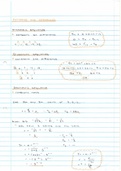
binary to decimal: adding up the numbers with a “I”
decimal to binary: subtracting/diving method
binary to hexadecimal: separate into 4s and find hexadecimal equivalent
hexadecimal to binary: find 4-bit binary equivalent of each number/letter
hexadecimal to decimal:
decimal to hexadecimal: divide by 16 until 0, count the remainders backwards
shifting left (x)
shifting right (divide)
Use of the Hexadecimal System
Examples:
● Defining colours in Hypertext Markup Language (HTML)
● Media Access Control (MAC) addresses (a number that uniquely identifies a device on a network)
● Assembly languages and machine code
● Memory Dumps
● Debugging (method to find errors in a program)
● Display error codes (numbers refer to the memory location of the error)
● IP (Internet Protocol) addresses
ASCII
● uses 1 byte to store value - 7 bit code
○ 0 is at 48
○ A is at 65
○ B is 66
○ a is at 97
Unicode
● contains all international languages
,Sound
● analogue converted to digital form by sampling sound waves at regular time intervals where the
amplitude is measured
● how? - The value is converted to digital form, each sample of the sound wave is then encoded as a
series of binary digits, a series of readings gives an approximate representation of the sound wave
sampling resolution
● sampling resolution: the number of bits per sample
● sampling rate: the number of sound samples taken per second, measured in Hertz (Hz)
● higher sample rate/resolution pros and cons:
Benefits Drawbacks
larger dynamic range produces larger file size
better sound quality takes longer to transmit/download music files
less sound distortion requires greater processing power
Images
Bitmap Images
● Bitmap images are made up of pixels
● A bitmap image is stored in a computer as a series of binary numbers
Colour Depth
● colour depth: the number of bits representing each colour
● An 8-bit colour depth means that each pixel can be one of 256 colours (2^8 = 256)
● A 1-bit colour depth is either black/white (2^1 = 2)
Image Resolution
● Image resolution refers to the number of pixels that make up an image; for example, an image
could contain 4096 × 3072 pixels.
● low resolution - pixelated
Measurement of the Size of
Computer Memories
● A binary digit is referred to as a BIT
● 8 bits is a byte
● 4 bits is a nibble
● Byte is used to measure memory size
, Calculation of File Size
● The file size of an image is calculated as: image resolution (in pixels) × colour depth (in bits)
● The size of a mono sound file is calculated as: sample rate (in Hz) × sample resolution (in bits) ×
length of sample (in seconds). (For a stereo sound file, you would then multiply the result by two.)
File Types
● Musical Instrument Digital Format (MIDI)
● MP3
● MP4
● Joint Photographic Experts Group (JPEG)
Lossless and Lossy File Compression
lossy file compression
● the file compression algorithm eliminates unnecessary data from the file.
● lower sampling rate or resolution for images and sound
lossless file compression
● All the data bits from the original file are reconstructed when the file again is uncompressed.
● no data lost
Run-length encoding (RLE)
● can be used for lossless compression
● A repeating string is encoded into two values: the first value represents the number of identical
data items (e.g. characters), and the second value represents the code of the data item (such as
ASCII code if it is a keyboard character)
○ e.g. ‘aaaaabbbbccddddd’ becomes “05 97 04 98 02 99 05 100.”
binary
binary to decimal: adding up the numbers with a “I”
decimal to binary: subtracting/diving method
binary to hexadecimal: separate into 4s and find hexadecimal equivalent
hexadecimal to binary: find 4-bit binary equivalent of each number/letter
hexadecimal to decimal:
decimal to hexadecimal: divide by 16 until 0, count the remainders backwards
shifting left (x)
shifting right (divide)
Use of the Hexadecimal System
Examples:
● Defining colours in Hypertext Markup Language (HTML)
● Media Access Control (MAC) addresses (a number that uniquely identifies a device on a network)
● Assembly languages and machine code
● Memory Dumps
● Debugging (method to find errors in a program)
● Display error codes (numbers refer to the memory location of the error)
● IP (Internet Protocol) addresses
ASCII
● uses 1 byte to store value - 7 bit code
○ 0 is at 48
○ A is at 65
○ B is 66
○ a is at 97
Unicode
● contains all international languages
,Sound
● analogue converted to digital form by sampling sound waves at regular time intervals where the
amplitude is measured
● how? - The value is converted to digital form, each sample of the sound wave is then encoded as a
series of binary digits, a series of readings gives an approximate representation of the sound wave
sampling resolution
● sampling resolution: the number of bits per sample
● sampling rate: the number of sound samples taken per second, measured in Hertz (Hz)
● higher sample rate/resolution pros and cons:
Benefits Drawbacks
larger dynamic range produces larger file size
better sound quality takes longer to transmit/download music files
less sound distortion requires greater processing power
Images
Bitmap Images
● Bitmap images are made up of pixels
● A bitmap image is stored in a computer as a series of binary numbers
Colour Depth
● colour depth: the number of bits representing each colour
● An 8-bit colour depth means that each pixel can be one of 256 colours (2^8 = 256)
● A 1-bit colour depth is either black/white (2^1 = 2)
Image Resolution
● Image resolution refers to the number of pixels that make up an image; for example, an image
could contain 4096 × 3072 pixels.
● low resolution - pixelated
Measurement of the Size of
Computer Memories
● A binary digit is referred to as a BIT
● 8 bits is a byte
● 4 bits is a nibble
● Byte is used to measure memory size
, Calculation of File Size
● The file size of an image is calculated as: image resolution (in pixels) × colour depth (in bits)
● The size of a mono sound file is calculated as: sample rate (in Hz) × sample resolution (in bits) ×
length of sample (in seconds). (For a stereo sound file, you would then multiply the result by two.)
File Types
● Musical Instrument Digital Format (MIDI)
● MP3
● MP4
● Joint Photographic Experts Group (JPEG)
Lossless and Lossy File Compression
lossy file compression
● the file compression algorithm eliminates unnecessary data from the file.
● lower sampling rate or resolution for images and sound
lossless file compression
● All the data bits from the original file are reconstructed when the file again is uncompressed.
● no data lost
Run-length encoding (RLE)
● can be used for lossless compression
● A repeating string is encoded into two values: the first value represents the number of identical
data items (e.g. characters), and the second value represents the code of the data item (such as
ASCII code if it is a keyboard character)
○ e.g. ‘aaaaabbbbccddddd’ becomes “05 97 04 98 02 99 05 100.”