Packer Tracer cheatsheet
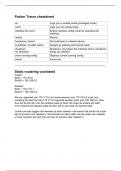
en Logs you in enable mode (privileged mode)
conf t Logs you into config mode
interface fa/<num> Enters interface config mode for specified eth
interface
reload Reboot
hostname <name> Set hostname to network device
ip address <ip-addr mask> Assigns ip address and subnet mask
shutdown Shutdown, shut down the interface and no shutdown
no shutdown brings up interface
show running-config Displays current running config
tracert traceroute
----------------------------------------------------------------------------------------------------------------
Static routering voorbeeld
router1:
Eth0 = 172.16.01
Eth0/0 = 192.168.0.1
Router2
Eth0 = 172.17.0.1
Eth0/0 = 192.168.0.2
Als een apparaat van 172.17.0.0 wil communiceren met 172.16.0.0 moet voor
routering de next hop niet 172.17.0.0 ingevuld worden maar juist 192.168.0.2. Kies
dus niet de eth adrr van het netwerk waar je heen wilt maar de andere eth addr.
Voor network het netwerk waar je heen wilt en de mask de subnet mask.
Je kan ook wel zeggen dat wanneer je naar netwerk x wil komen die achter de router
ligt en je eerst over netwerk y moet komen en dat ip addr van de router van netwerk
y moet invoeren als next hop om door te kunnen naar netwerk x.
, DHCP pool CLI (router) (99, 102)
1. Ip dhcp pool <name>
2. Network 192.168.x.x 255.x.x.x
3. Default-router 192.168.x.x
4. dns-server 180.115.0.6
5. Ip dhcp excluded-address 192.168.0.1 192.168.0.49 #ip adres start dus bij 50
Routers stoppen broadcast messages (dus ook dhcp berichten) maar als een
apparaat achter een router staat kan je het commando 'ip helper-address <ip
server>' gebruiken. Dit moet je doen met beide interfaces op hetzelfde ip, dit heet
een dhcp relay-agent
----------------------------------------------------------------------------------------------------------------
NAT CLI (router) (106, 108, 109, 114)
1. Interface gigabitethernet<ingaand>
2. Ip address 10.x.x.x 255.x.x.x
3. Ip nat inside
1. Interface gigabitethernet<uitgaand>
2. Ip address dhcp
3. Ip nat outside
4. Access-list 1 permit any
5. Ip nat inside source list 1 int g<uitgaand> overload
Static nat (114)
1. Ip nat inside source static 10.x.x.1 88.x.x.x.1
2. Ip nat inside source static 10.x.x.2 88.x.x.x.2
----------------------------------------------------------------------------------------------------------------
Vlan CLI MLS (122, 128, 129)
#ALTIJD IP ROUTING ALS EERSTE COMMAND IN DE MLS ZETTEN#
1. Hostname MLS
2. Ip routing
3. Vlan <>
4. Name <name>
5. #Int range fa0/1-6 (gui)
6. #Switchport access vlan <> (gui)
7. Exit
8. Int vlan <>
9. Ip address 192.168.100.1 255.255.255.0
Range ports op vlan zetten
int range fa 0/1-10
switchport access vlan 10
en Logs you in enable mode (privileged mode)
conf t Logs you into config mode
interface fa/<num> Enters interface config mode for specified eth
interface
reload Reboot
hostname <name> Set hostname to network device
ip address <ip-addr mask> Assigns ip address and subnet mask
shutdown Shutdown, shut down the interface and no shutdown
no shutdown brings up interface
show running-config Displays current running config
tracert traceroute
----------------------------------------------------------------------------------------------------------------
Static routering voorbeeld
router1:
Eth0 = 172.16.01
Eth0/0 = 192.168.0.1
Router2
Eth0 = 172.17.0.1
Eth0/0 = 192.168.0.2
Als een apparaat van 172.17.0.0 wil communiceren met 172.16.0.0 moet voor
routering de next hop niet 172.17.0.0 ingevuld worden maar juist 192.168.0.2. Kies
dus niet de eth adrr van het netwerk waar je heen wilt maar de andere eth addr.
Voor network het netwerk waar je heen wilt en de mask de subnet mask.
Je kan ook wel zeggen dat wanneer je naar netwerk x wil komen die achter de router
ligt en je eerst over netwerk y moet komen en dat ip addr van de router van netwerk
y moet invoeren als next hop om door te kunnen naar netwerk x.
, DHCP pool CLI (router) (99, 102)
1. Ip dhcp pool <name>
2. Network 192.168.x.x 255.x.x.x
3. Default-router 192.168.x.x
4. dns-server 180.115.0.6
5. Ip dhcp excluded-address 192.168.0.1 192.168.0.49 #ip adres start dus bij 50
Routers stoppen broadcast messages (dus ook dhcp berichten) maar als een
apparaat achter een router staat kan je het commando 'ip helper-address <ip
server>' gebruiken. Dit moet je doen met beide interfaces op hetzelfde ip, dit heet
een dhcp relay-agent
----------------------------------------------------------------------------------------------------------------
NAT CLI (router) (106, 108, 109, 114)
1. Interface gigabitethernet<ingaand>
2. Ip address 10.x.x.x 255.x.x.x
3. Ip nat inside
1. Interface gigabitethernet<uitgaand>
2. Ip address dhcp
3. Ip nat outside
4. Access-list 1 permit any
5. Ip nat inside source list 1 int g<uitgaand> overload
Static nat (114)
1. Ip nat inside source static 10.x.x.1 88.x.x.x.1
2. Ip nat inside source static 10.x.x.2 88.x.x.x.2
----------------------------------------------------------------------------------------------------------------
Vlan CLI MLS (122, 128, 129)
#ALTIJD IP ROUTING ALS EERSTE COMMAND IN DE MLS ZETTEN#
1. Hostname MLS
2. Ip routing
3. Vlan <>
4. Name <name>
5. #Int range fa0/1-6 (gui)
6. #Switchport access vlan <> (gui)
7. Exit
8. Int vlan <>
9. Ip address 192.168.100.1 255.255.255.0
Range ports op vlan zetten
int range fa 0/1-10
switchport access vlan 10