Name:_____________________________________________
EEE 202 Lab 4: Arduino
*** IMPORTANT NOTE REGARDING THE ARDUINO BOARDS***
Never connect the USB cable to a computer and a battery or power supply to the board at the same time or
you risk sending a charge in through the USB port and damaging the computer. Always keep any power
supplies separate and distinct from the 5V or 3V pin of the Arduino***
Data Sheet
Part 1: SOS Code
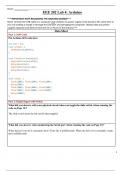
Put Arduino SOS code here:
int led = 13;
void setup() {
pinMode(led,OUTPUT);
}
void flash(int duration){
digitalWrite(led,HIGH);
delay(duration);
digitalWrite(led,LOW);
delay(duration);
}
void loop() {
flash(200); flash(200); flash(200);
delay(300);
flash(500); flash(500); flash(500);
flash(200); flash(200); flash(200);
delay(1000);
}
Part 2: Digital Input with Switch
What did you observe with your physical circuit when you toggle the slide switch (when running the
code on Page 12)?
The slide switch turns the led on/off when toggled.
What did you observe when monitoring the Serial port (when running the code on Page 13)?
When the led is not lit it constantly shows Time On: 0 milliSeconds. When the led is lit it constantly counts
up in milliSeconds.
1
, Provide a screenshot of your Serial Port window here (Have a look at an example screenshot at the
end of this document):
2
EEE 202 Lab 4: Arduino
*** IMPORTANT NOTE REGARDING THE ARDUINO BOARDS***
Never connect the USB cable to a computer and a battery or power supply to the board at the same time or
you risk sending a charge in through the USB port and damaging the computer. Always keep any power
supplies separate and distinct from the 5V or 3V pin of the Arduino***
Data Sheet
Part 1: SOS Code
Put Arduino SOS code here:
int led = 13;
void setup() {
pinMode(led,OUTPUT);
}
void flash(int duration){
digitalWrite(led,HIGH);
delay(duration);
digitalWrite(led,LOW);
delay(duration);
}
void loop() {
flash(200); flash(200); flash(200);
delay(300);
flash(500); flash(500); flash(500);
flash(200); flash(200); flash(200);
delay(1000);
}
Part 2: Digital Input with Switch
What did you observe with your physical circuit when you toggle the slide switch (when running the
code on Page 12)?
The slide switch turns the led on/off when toggled.
What did you observe when monitoring the Serial port (when running the code on Page 13)?
When the led is not lit it constantly shows Time On: 0 milliSeconds. When the led is lit it constantly counts
up in milliSeconds.
1
, Provide a screenshot of your Serial Port window here (Have a look at an example screenshot at the
end of this document):
2