@2027// Q&A | 100% Verified Start your exams prepared! solutions.
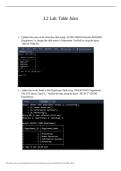
3.2 Lab: Table Joins
1. Updated the name of the Branches table using ‘ALTER TABLE Branches RENAME
Department;’ to change the table name to Department. Verified by using the query
‘SHOW TABLES;.’
2. Added data to the fields in the Department Table using ‘INSERT INTO Department
VALUES (data1,’data2’);.’ Verified the data using the query ‘SELECT* FROM
Department;.’
This study source was downloaded by 1827175 from cliffsnotes.com on 01-08-2026 20:33:32 GMT -06:00
1 09/01/2026
https://www.cliffsnotes.com//study-notes/3690030
, @2027// Q&A | 100% Verified Start your exams prepared! solutions.
3. Now, perform joins between the Department and Employee tables and show
results for how many employees work in each one of the four departments. This will
only provide information on the records that are already there.
a. Department 1 = Accounting
i. Command: SELECT First_Name, Last_Name,
Department.Department_Name FROM Employee INNER JOIN
Department ON Employee.Department_ID = Department.Department_ID
WHERE Employee.Department_ID = 1;
b. Using SELECT statements similar to the one above, perform joins to produce
results for the following tables:
i. Department 2 = Human Resources
ii. Department 3 = Information Systems
iii. Department 4 = Marketing
c. Capture the results of these joins and validate your work by providing a
screenshot. You should have the same number of records as you do employees.
This study source was downloaded by 1827175 from cliffsnotes.com on 01-08-2026 20:33:32 GMT -06:00
2 09/01/2026
https://www.cliffsnotes.com//study-notes/3690030
3.2 Lab: Table Joins
1. Updated the name of the Branches table using ‘ALTER TABLE Branches RENAME
Department;’ to change the table name to Department. Verified by using the query
‘SHOW TABLES;.’
2. Added data to the fields in the Department Table using ‘INSERT INTO Department
VALUES (data1,’data2’);.’ Verified the data using the query ‘SELECT* FROM
Department;.’
This study source was downloaded by 1827175 from cliffsnotes.com on 01-08-2026 20:33:32 GMT -06:00
1 09/01/2026
https://www.cliffsnotes.com//study-notes/3690030
, @2027// Q&A | 100% Verified Start your exams prepared! solutions.
3. Now, perform joins between the Department and Employee tables and show
results for how many employees work in each one of the four departments. This will
only provide information on the records that are already there.
a. Department 1 = Accounting
i. Command: SELECT First_Name, Last_Name,
Department.Department_Name FROM Employee INNER JOIN
Department ON Employee.Department_ID = Department.Department_ID
WHERE Employee.Department_ID = 1;
b. Using SELECT statements similar to the one above, perform joins to produce
results for the following tables:
i. Department 2 = Human Resources
ii. Department 3 = Information Systems
iii. Department 4 = Marketing
c. Capture the results of these joins and validate your work by providing a
screenshot. You should have the same number of records as you do employees.
This study source was downloaded by 1827175 from cliffsnotes.com on 01-08-2026 20:33:32 GMT -06:00
2 09/01/2026
https://www.cliffsnotes.com//study-notes/3690030