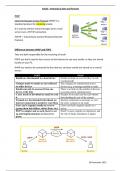
Emails – Protocols & Store and Forward
IMAP
Internet Message Access Protocol (IMAP) is a
standard protocol for receiving emails.
It is used to retrieve email messages form a mail
server over a TCP/IP connection.
TCP/IP = Transmission Control Protocol/Internet
Protocol
Difference between IMAP and POP3
They are both responsible for the receiving of email
POP3 you don’t need to have access to the Internet to see your emails, as they are stored
locally on your PC.
IMAP you need to be connected to the Internet, and your emails are stored on a central
server.
POP3 IMAP
Emails are downloaded to a local device Emails are kept on a server (they’re only
synchronized)
Changes made to emails are not reflected Any changes are synchronized across
on other devices devices (e.g. a message marked as read)
Emails can only be accessed from one There’s no limit on the number of devices
device at the time accessing emails simultaneously
A user needs to download an email to read Headers of an email can be read without
it downloading the rest of the content
If emails are downloaded beforehand, no Internet connection is necessary to view
internet connection is needed to read them the entire contents of an email
Users can’t organise emails on a server Users can freely organise emails on a
(group them into folders, delete them, etc.) server
POP3 is simpler and as such, faster to set IMAP is more complex to implement, and
up and implementations are less error- the risk of faulty installation is higher
prone
28 November 2023
IMAP
Internet Message Access Protocol (IMAP) is a
standard protocol for receiving emails.
It is used to retrieve email messages form a mail
server over a TCP/IP connection.
TCP/IP = Transmission Control Protocol/Internet
Protocol
Difference between IMAP and POP3
They are both responsible for the receiving of email
POP3 you don’t need to have access to the Internet to see your emails, as they are stored
locally on your PC.
IMAP you need to be connected to the Internet, and your emails are stored on a central
server.
POP3 IMAP
Emails are downloaded to a local device Emails are kept on a server (they’re only
synchronized)
Changes made to emails are not reflected Any changes are synchronized across
on other devices devices (e.g. a message marked as read)
Emails can only be accessed from one There’s no limit on the number of devices
device at the time accessing emails simultaneously
A user needs to download an email to read Headers of an email can be read without
it downloading the rest of the content
If emails are downloaded beforehand, no Internet connection is necessary to view
internet connection is needed to read them the entire contents of an email
Users can’t organise emails on a server Users can freely organise emails on a
(group them into folders, delete them, etc.) server
POP3 is simpler and as such, faster to set IMAP is more complex to implement, and
up and implementations are less error- the risk of faulty installation is higher
prone
28 November 2023