4 3
Computertekenen uitleg:
Controls:
Control Z: ongedaan maken.
Control B: naar achter zetten.
Control F: naar voor zetten.
Control L: object draaien.
Control G: groep maken van objecten.
Control M: verplaatsen via x en y-as.
Control C: kopiëren van object.
Control V: plakken van object.
Control E: extrusie maken
5
Extra:
Enter: bevestigen.
Tab: x en y-as aanpassen object.
Delete: verwijderen.
Shift: een voor een aanduiden + verplaatsen.
Alt: verplaatsen van een of meer objecten.
Esc: niet bevestigen.
G: referentiepunt zetten.
Muis: object verplaatsen.
Hand: blad verplaatsen.
Dubbelklikken op gereedschap: direct vorm aanpassen van object.
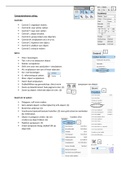
Zoom op tekenformaat: hele pagina te zien. (1)
Zoom op object: enkel dat object te zien. (2) 6
1 2
Goed om te weten:
Polygoon: zelf vorm maken.
Extra details object: rechterzijkant bij info object. (3)
Restricties altijd op: (4)
Voorkeuren/opmaak bestand instellen: (5) voor grid schaal en eenheden
(bv millimeter).
Object in polygoon zetten: (bv om hoeken af te
ronden) op object tikken: (6)
Paletten aanpassen: (7) 7
Straal aanpassen boog: dubbel klik op
object (8)
8
Computertekenen uitleg:
Controls:
Control Z: ongedaan maken.
Control B: naar achter zetten.
Control F: naar voor zetten.
Control L: object draaien.
Control G: groep maken van objecten.
Control M: verplaatsen via x en y-as.
Control C: kopiëren van object.
Control V: plakken van object.
Control E: extrusie maken
5
Extra:
Enter: bevestigen.
Tab: x en y-as aanpassen object.
Delete: verwijderen.
Shift: een voor een aanduiden + verplaatsen.
Alt: verplaatsen van een of meer objecten.
Esc: niet bevestigen.
G: referentiepunt zetten.
Muis: object verplaatsen.
Hand: blad verplaatsen.
Dubbelklikken op gereedschap: direct vorm aanpassen van object.
Zoom op tekenformaat: hele pagina te zien. (1)
Zoom op object: enkel dat object te zien. (2) 6
1 2
Goed om te weten:
Polygoon: zelf vorm maken.
Extra details object: rechterzijkant bij info object. (3)
Restricties altijd op: (4)
Voorkeuren/opmaak bestand instellen: (5) voor grid schaal en eenheden
(bv millimeter).
Object in polygoon zetten: (bv om hoeken af te
ronden) op object tikken: (6)
Paletten aanpassen: (7) 7
Straal aanpassen boog: dubbel klik op
object (8)
8