COS 132 Chapter 2
COS 132
CHAPTER 2 – INTRO TO C++
UNTI 2.1- THE PARTS OF A C++ PROGRAM
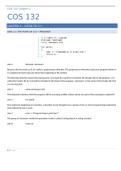
Line 2 #include <iostream>
Because this line starts w #, it is called a preprocessor directive. The preprocessor directive reads your program before it
is compiled and only executes those lines beginning w the symbol.
The #include directive causes the preprocessor to include the contents of another file (header file) in the program. It is
called the header file bc it should be included in the head of the program. <iostream> is the name of the header file that
is to be included.
Line 3 using namespace std;
This statement declares that the program will be accessing entities whose names are part of the namespace called std.
Line 5 int main()
This marks the beginning of a function, a function can be thought of as a group of one or more programming statements
that collectively has a name.
Line 7 cout << “Programming is great fun!”;
The group of characters inside the quotation marks is called a string lateral or string constant.
Line 8 return 0;
1|P a g e
, COS 132 Chapter 2
This sends the in value 0 back to the operating system upon the programs completion, the value indicates that a
program executed successfully.
UNIT 2.2 – THE COUT OBJECT
This is the simplest type of screen output that a program can display – console output which is just plain text.
Cout is classified as a stream object, which means it works w streams of data. To print a message on the screen, you
send a stream of characters to cout. When << operator is used in this way, it is called the stream insertion operator.
Think of it as an arrow that must point towards cout.
There are two ways to instruct cout to start a new line.
1. Send cout a stream manipulator called endl
- cout << “text” << endl;
2. Insert an escape sequence in the string itself, this starts w “\” and is follows by a control character
- cout << “text\n”;
- When using escape sequences, do not put a space between the backslash and the control character.
2|P a g e
COS 132
CHAPTER 2 – INTRO TO C++
UNTI 2.1- THE PARTS OF A C++ PROGRAM
Line 2 #include <iostream>
Because this line starts w #, it is called a preprocessor directive. The preprocessor directive reads your program before it
is compiled and only executes those lines beginning w the symbol.
The #include directive causes the preprocessor to include the contents of another file (header file) in the program. It is
called the header file bc it should be included in the head of the program. <iostream> is the name of the header file that
is to be included.
Line 3 using namespace std;
This statement declares that the program will be accessing entities whose names are part of the namespace called std.
Line 5 int main()
This marks the beginning of a function, a function can be thought of as a group of one or more programming statements
that collectively has a name.
Line 7 cout << “Programming is great fun!”;
The group of characters inside the quotation marks is called a string lateral or string constant.
Line 8 return 0;
1|P a g e
, COS 132 Chapter 2
This sends the in value 0 back to the operating system upon the programs completion, the value indicates that a
program executed successfully.
UNIT 2.2 – THE COUT OBJECT
This is the simplest type of screen output that a program can display – console output which is just plain text.
Cout is classified as a stream object, which means it works w streams of data. To print a message on the screen, you
send a stream of characters to cout. When << operator is used in this way, it is called the stream insertion operator.
Think of it as an arrow that must point towards cout.
There are two ways to instruct cout to start a new line.
1. Send cout a stream manipulator called endl
- cout << “text” << endl;
2. Insert an escape sequence in the string itself, this starts w “\” and is follows by a control character
- cout << “text\n”;
- When using escape sequences, do not put a space between the backslash and the control character.
2|P a g e