2
1. Extracting Data from the Whole Table
SELECT *
FROM <tableName>
SELECT Extracts data from the table
* All fields for that record - wildcard
FROM From the specified table
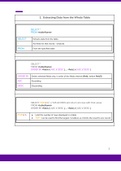
SELECT *
FROM <tableName>
ORDER BY <field1> ( ASC / DESC ), … <fieldn> ( ASC / DESC )
ORDER BY Orders selected fields only, in order of the fields entered (field1 before field2)
ASC Ascending
DESC Descending
SELECT TOP <n> * // MS ACCESS will return all rows with that value
FROM <tableName>
ORDER BY <field1> ( ASC / DESC ), … <fieldn> ( ASC / DESC )
TOP <n> ● Limit the number of rows displayed in a table
● TOP 1 can be used to find the largest / smallest, as it limits the result to one record
2
, 3
2. Limiting The Fields
SELECT <field1>, … <fieldn>
FROM <tableName>
<field1>, … <fieldn> Which fields are displayed and in what order
SELECT DISTINCT <field1>, … <fieldn>
FROM <tableName>
DISTINCT Fetch unique rows based on the fields selected, ignoring duplicates
3. Calculations
SELECT <field1>, … <fieldn>, <calculations>
FROM <tableName>
<calculations> The result set will display the listed fields as columns and a new column for
each calculation
The new column is given a random name e.g. ‘Expr1005’
SELECT <field1>, … <fieldn>, <calculations> AS [name]
FROM <tableName>
AS [name] Specifies the name for the column
Use square brackets for 3 words or more, or if the name includes keywords e.g. BY
Can also use CamelCase
3
1. Extracting Data from the Whole Table
SELECT *
FROM <tableName>
SELECT Extracts data from the table
* All fields for that record - wildcard
FROM From the specified table
SELECT *
FROM <tableName>
ORDER BY <field1> ( ASC / DESC ), … <fieldn> ( ASC / DESC )
ORDER BY Orders selected fields only, in order of the fields entered (field1 before field2)
ASC Ascending
DESC Descending
SELECT TOP <n> * // MS ACCESS will return all rows with that value
FROM <tableName>
ORDER BY <field1> ( ASC / DESC ), … <fieldn> ( ASC / DESC )
TOP <n> ● Limit the number of rows displayed in a table
● TOP 1 can be used to find the largest / smallest, as it limits the result to one record
2
, 3
2. Limiting The Fields
SELECT <field1>, … <fieldn>
FROM <tableName>
<field1>, … <fieldn> Which fields are displayed and in what order
SELECT DISTINCT <field1>, … <fieldn>
FROM <tableName>
DISTINCT Fetch unique rows based on the fields selected, ignoring duplicates
3. Calculations
SELECT <field1>, … <fieldn>, <calculations>
FROM <tableName>
<calculations> The result set will display the listed fields as columns and a new column for
each calculation
The new column is given a random name e.g. ‘Expr1005’
SELECT <field1>, … <fieldn>, <calculations> AS [name]
FROM <tableName>
AS [name] Specifies the name for the column
Use square brackets for 3 words or more, or if the name includes keywords e.g. BY
Can also use CamelCase
3