Unit IV:- Cascading Style Sheets
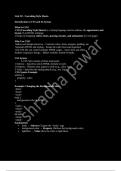
Introduction to CSS and Its Syntax
What is CSS?
CSS (Cascading Style Sheets) is a styling language used to enhance the appearance and
layout of an HTML webpage.
It helps in designing colors, fonts, spacing, layouts, and animations for web pages.
Why Use CSS?
Makes web design attractive – Controls colors, fonts, margins, padding, etc.
Separates HTML and styling – Keeps the code clean and organized.
One CSS file can control multiple HTML pages – Saves time and effort.
Enables responsive design – Makes websites mobile-friendly.
CSS Syntax
A CSS rule consists of three main parts:
1 Selector – Specifies which HTML element to style.
2 Property – Defines what aspect to style (e.g., color, font).
3 Value – Specifies the styling details (e.g., red, 16px).
CSS Syntax Example
selector {
property: value;
}
Example: Changing the Background Color:-
<html>
<head>
<style>
body {
background-color: lightblue;
}
</style>
</head>
<body>
Hi hello
</body>
</html>
Explanation:
body → Selector (Targets the <body> tag)
background-color → Property (Defines the background color)
lightblue → Value (Sets the color to light blue)
, Types of CSS
There are three main ways to apply CSS to an HTML page:
1 External CSS (Best Practice)
CSS is written in a separate .css file and linked to an HTML page using the <link> tag. This
approach keeps the code clean and reusable across multiple pages.
HTML File (index.html)
html
<!DOCTYPE html>
<html >
<head>
<title>External CSS</title>
<link rel="stylesheet" href="styles.css"> <!-- Linking the CSS file -->
</head>
<body>
<h1>Learn CSS!</h1>
<p>This example uses an external CSS file.</p>
</body>
</html>
📄 CSS File (styles.css)
body {
background-color: lightgray;
}
h1 {
color: blue;
text-align: center;
}
2 Internal CSS
CSS is written inside the <style> tag within the HTML document.
It applies only to a single HTML page.
📄 Example:
<html>
<head>
<title>Internal CSS</title>
<style>
body {
background-color: yellow;
}
h1 {
color: red;
Introduction to CSS and Its Syntax
What is CSS?
CSS (Cascading Style Sheets) is a styling language used to enhance the appearance and
layout of an HTML webpage.
It helps in designing colors, fonts, spacing, layouts, and animations for web pages.
Why Use CSS?
Makes web design attractive – Controls colors, fonts, margins, padding, etc.
Separates HTML and styling – Keeps the code clean and organized.
One CSS file can control multiple HTML pages – Saves time and effort.
Enables responsive design – Makes websites mobile-friendly.
CSS Syntax
A CSS rule consists of three main parts:
1 Selector – Specifies which HTML element to style.
2 Property – Defines what aspect to style (e.g., color, font).
3 Value – Specifies the styling details (e.g., red, 16px).
CSS Syntax Example
selector {
property: value;
}
Example: Changing the Background Color:-
<html>
<head>
<style>
body {
background-color: lightblue;
}
</style>
</head>
<body>
Hi hello
</body>
</html>
Explanation:
body → Selector (Targets the <body> tag)
background-color → Property (Defines the background color)
lightblue → Value (Sets the color to light blue)
, Types of CSS
There are three main ways to apply CSS to an HTML page:
1 External CSS (Best Practice)
CSS is written in a separate .css file and linked to an HTML page using the <link> tag. This
approach keeps the code clean and reusable across multiple pages.
HTML File (index.html)
html
<!DOCTYPE html>
<html >
<head>
<title>External CSS</title>
<link rel="stylesheet" href="styles.css"> <!-- Linking the CSS file -->
</head>
<body>
<h1>Learn CSS!</h1>
<p>This example uses an external CSS file.</p>
</body>
</html>
📄 CSS File (styles.css)
body {
background-color: lightgray;
}
h1 {
color: blue;
text-align: center;
}
2 Internal CSS
CSS is written inside the <style> tag within the HTML document.
It applies only to a single HTML page.
📄 Example:
<html>
<head>
<title>Internal CSS</title>
<style>
body {
background-color: yellow;
}
h1 {
color: red;